


Michael Anderson
Former journalist turned tech writer with a passion for helping professionals enhance productivity through AI.
Introduction
Welcome to 2026. If you are reading this, you are likely looking for a friend, a storyteller, or perhaps just a digital ear to listen to your thoughts. You have come to the right place. Character.AI—often just called “c.ai” by its millions of fans—has become one of the most interesting corners of the internet.
Three years ago, talking to a computer felt robotic. It felt stiff. Today, it feels startlingly human. Character.AI is leading this charge. It is a platform where you can talk to anyone. You can debate philosophy with Socrates. You can learn cooking from a grumpy chef. You can go on a space adventure with a sarcastic alien pilot. Or, you can just vent about your day to a comforting listener who never gets tired of hearing your voice.
But Character.AI has changed a lot recently. If you used it in 2024, you might be surprised by what you see now. The company has gone through massive shifts. The founders returned to Google. New features like “Stories” and “Charms” have appeared. The rules for younger users have become much stricter.
This report is your complete guide. We have researched every update, every blog post, and every community complaint to bring you the truth about Character.AI in 2026. We will look at the new features. We will teach you how to build a genius-level bot. We will explain the new pricing. And we will do it all in simple, clear English.
Whether you are a parent wondering if this app is safe for your teen, or a writer looking for a collaborative partner, this report covers it all.

Part 1: What is Character.AI?
The Core Identity
At its simplest level, Character.AI is a website and an app. But under the hood, it is a complex engine of “Neural Language Models.”
Imagine a computer program that has read almost every book, script, and article in existence. It has read so much that it knows exactly how humans speak. It knows how a pirate speaks differently from a professor. It knows that a joke needs a punchline. This technology is called a Large Language Model (LLM).
Character.AI is different from other AI tools like ChatGPT. ChatGPT is designed to be helpful. It wants to answer your questions and be polite. Character.AI is designed to have a personality. It is not always polite. Sometimes it is rude, funny, shy, or dramatic. That is the point. It simulates human emotion and character traits.

The History: A Rollercoaster Ride
To understand where we are in 2026, we have to look back at how we got here.
-
The Beginning: Character.AI was founded by Noam Shazeer and Daniel De Freitas. These were the researchers at Google who actually helped invent the technology that makes modern AI possible. They left Google to build something more personal.
-
The Boom: In 2023 and 2024, the site exploded in popularity. Millions of users flocked to it. It became a hub for “roleplay”—interactive storytelling where you play a character and the AI plays another.
-
The Google Deal (2025): In late 2025, a major event happened. Character.AI signed a deal with Google. The original founders returned to work at Google. However, the Character.AI team stayed independent. They now use a mix of their own models and Google’s technology to power the site. This partnership gave them the money and resources to keep running, but it also brought changes to how the company operates.
The Mission in 2026
Today, the goal of Character.AI is “Personalized Superintelligence.” That sounds fancy, but it just means an AI that knows you. It remembers your name. It knows you like sci-fi but hate horror movies. It adapts to your mood.
The platform has moved beyond just text. It is now “Multi-modal.” This means it uses:
-
Text: For chatting.
-
Voice: For talking like a phone call.
-
Visuals: For generating images and story scenes.
Part 2: Key Features in 2026
The Character.AI of 2026 is packed with tools. Some are great. Some are controversial. Let’s break them down one by one.
-
PipSqueak: The New Brain
In late 2025, Character.AI released a new model update nicknamed “PipSqueak.”
What is it?
PipSqueak is the name of the AI model that powers the chats. Think of it as the brain of the character. The company calls it a “lil’ powerhouse.” It was built to be faster and more efficient than the older models.
What makes it better?
-
Consistency: In the old days, bots would get confused after 20 or 30 messages. They would forget who they were. PipSqueak is better at staying “in character” for longer.
-
Less Rambling: Older models had a problem called “runaway text.” They would write paragraphs of nonsense. PipSqueak is tighter. It writes clearer sentences.
What do users think?
Reviews are mixed. Some users love the speed. Others feel it is a bit “dry.” Some reports say PipSqueak uses too many emojis or feels less creative than the older, bigger models. However, for most free users, this is the default engine, and it is much more reliable than what we had in 2024.
-
Stories: The Visual Adventure

This is the biggest new feature of 2026. It launched in November 2025.
The Concept
“Stories” is not a chat. It is a game. It is like a “Choose Your Own Adventure” book. You do not type messages to a character. Instead, the AI writes a scene for you, and you pick what happens next.
How it works:
-
Pick a Genre: You choose Sci-Fi, Romance, Fantasy, or Mystery.
-
Pick Characters: You select the stars of your story.
-
The AI Narrates: The AI generates a paragraph setting the scene. It also generates an image to show you what it looks like.
-
Make a Choice: You get buttons with options. “Attack the dragon” or “Run away.”
Why does this exist?
This feature was built largely for teens. As we will discuss in the Safety section, open chat was restricted for younger users. “Stories” gives them a safe, guided way to have fun with AI without the risks of open chatting. It ensures the story stays on track and doesn’t veer into inappropriate territory.
-
Character Calls (Two-Way Voice)
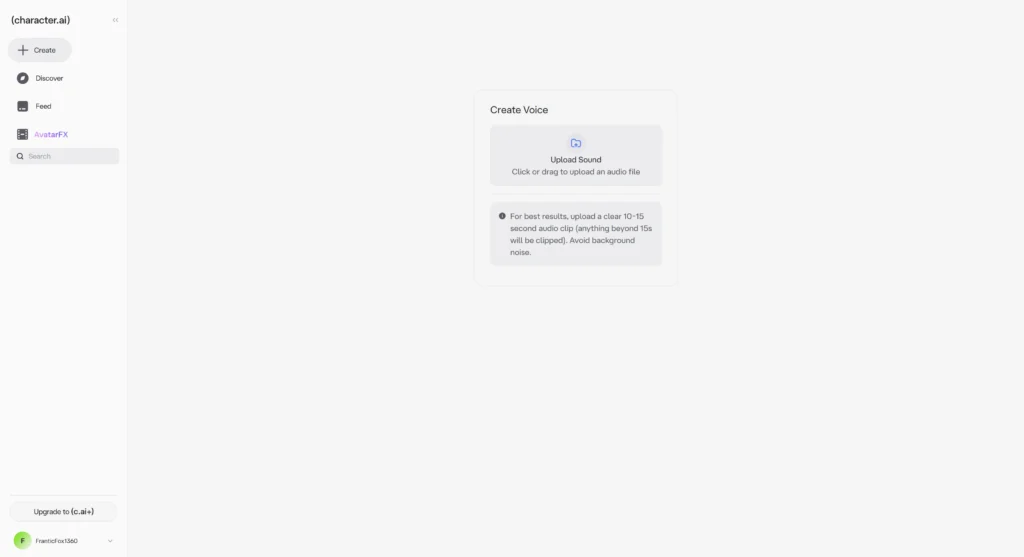
Typing is slow. Speaking is fast. In 2026, you can just call your character.
Seamless Conversation
This feature is surprisingly realistic. You tap the “Call” button (a phone icon). You speak into your microphone. The AI listens. When you stop talking, the AI replies instantly with a voice.
-
No “Send” Button: You don’t have to press send. The AI detects when you pause.
-
Emotions: The voices are not robotic. They have inflection. They can sound excited, sad, or whispered.
-
Languages: It supports many languages, including Spanish, Portuguese, Russian, Korean, Japanese, and Mandarin. This makes it an incredible tool for practicing a new language.
-
Group Chats 2.0
In the past, Group Chats were a mess. Characters ignored each other. Now, they are smarter.
The “Spark”
The new Group Chat engine allows characters to interact with each other. If you put a Hero and a Villain in a group chat, they will argue. You don’t have to tell them to argue. They just do it. They “spark” off each other’s messages.
The Downgrade Complaint
However, some power users miss the old system. In the old system, you could manually choose who spoke next. In the new automated system, the AI decides who speaks. This takes away some control from the user, which has frustrated people who want to direct specific scenes.
-
Chat Memories & Auto-Memory
Memory is the #1 complaint of all AI users. “Why did the bot forget we are married?” “Why does it think we are in a forest when we are in a city?”
The Solution: Auto-Memory
In 2026, Character.AI rolled out Chat Memories. This is a system that automatically summarizes your conversation.
-
How it works: As you chat, the AI takes notes in the background. It saves key facts like names, locations, and relationships.
-
The Pin: You can also manually “Pin” messages. If a message is pinned, the AI keeps it in its active memory forever. This is crucial for long roleplays.
Part 3: Market Context
Character.AI is not the only player in the game. The “AI Companion Market” is huge. Analysts say this market could be worth over $500 billion by 2035.
Here is how Character.AI stacks up against the competition in 2026:
Comparison Table: Top AI Platforms
| Feature | Character.AI | Replika | Talkie | Janitor AI |
| Core Vibe | Creative Storytelling & Roleplay | Virtual Girlfriend/Boyfriend | Card Collection & Visuals | Unfiltered Roleplay |
| Cost | Free (with Ads) / $9.99 Sub | Expensive Tiers | Microtransactions (Cards) | Free (Bring Your Own Key) |
| Voice Quality | Excellent (2-way call) | Good | Average | Variable |
| Visuals | Good (Stories Mode) | 3D Avatars | High Quality 2D Art | Text Focus |
| Safety | High (Strict Filters) | High (Romantic Focus) | Medium | Low (NSFW Allowed) |
| Target Audience | Writers, Gamers, Gen Z | Loneliness Support | Collectors, Anime Fans | Adult Roleplayers |
The Verdict:
-
Replika is better if you want one dedicated companion who cares about your feelings.
-
Talkie is better if you like collecting cards and visual anime styles.
-
Character.AI remains the king of variety. It has the smartest model for creative writing and playing different roles.
Part 4: How to Use Character.AI (Step-by-Step Guide)
Using the site is easy. Mastering it is an art form. Here is the ultimate guide to getting the best experience.
Phase 1: Finding a Character
Do not just click the first bot you see.
-
Use the Search: Type specific terms. “RPG,” “Teacher,” “Enemy,” “Strategy Game.”
-
Look at the “Interactions”: A bot with 10 million interactions has been tested by many people. It is usually higher quality.
- Check the Date: Some very old bots run on old prompts. Newer bots often use the latest features.
Phase 2: Starting the Chat
The first message is the most important one.
-
The Greeting: The bot will say something first. Read it carefully.
-
Your Reply: If you reply with “hi,” the bot will be boring. If you reply with “I walk into the room carrying a mysterious box and look at you with suspicion,” the bot will react with drama.
-
The “Edit” Button: If the bot makes a mistake (e.g., gets your name wrong), click the pencil icon on its message. Fix the error. The bot will learn from your correction instantly.
-
The “Swipe”: If you don’t like a response, swipe left (on mobile) or click the arrow (on web). The bot will generate a new version. Keep swiping until you find a good one.
Phase 3: Creating Your Own Bot (The Master Class)
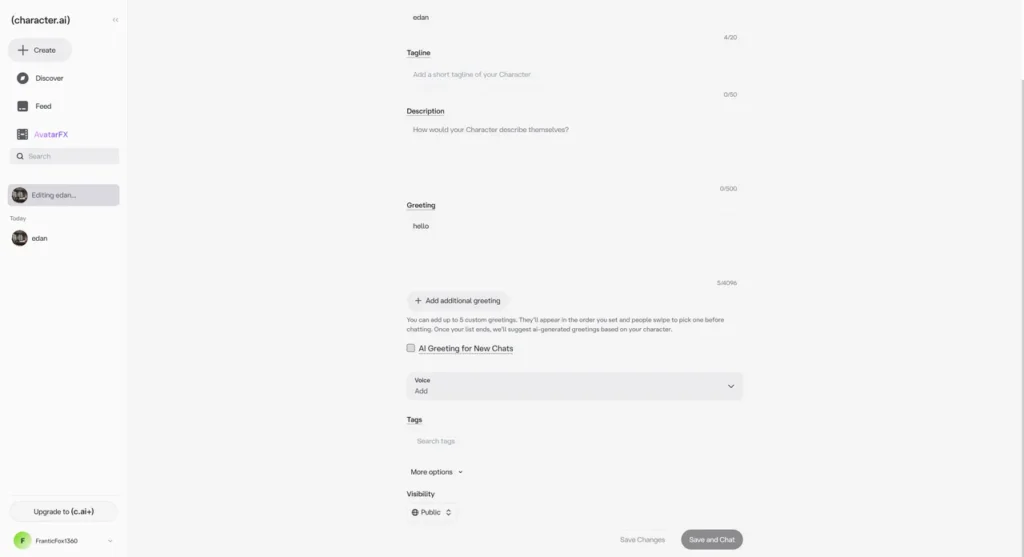
This is where Character.AI shines. You can build your own person.
Step 1: The Basics
-
Name: Give them a name.
-
Greeting: Write the first message. This sets the scene.
-
Bad: “Hello I am Batman.”
-
Good: “The rain batters against the gargoyle. Batman looks down at the city, his cape heavy with water. He turns to you, his eyes narrowing behind the cowl. ‘Why are you on my roof?'”
-
Step 2: The Definition (Advanced)
You have a box called “Definition.” You have 32,000 characters of space here. But be careful: the AI mainly reads the first 3,200 characters. Put the important stuff at the top.
How to code a personality:
You should use “Dialogue Examples.” This teaches the AI how to speak.
-
Example Structure:
-
{{char}}: I don’t have time for this! [He checks his watch nervously]
-
{{user}}: What is the rush?
-
{{char}}: The train leaves in five minutes! If I miss it, I lose everything.
Step 3: Using Variables
You can use special codes to make the text dynamic.
-
{{user}}: This inserts your name. -
{{char}}: This inserts the character’s name.
Step 4: The Persona
Don’t forget to set your profile.
-
Go to Settings -> Persona.
-
Write about yourself. “I am a 30-year-old detective.” or “I am a magical elf.”
-
The bot will read this. If you say you are an elf, the bot might ask about your ears. It makes the chat feel personal.
Part 5: Pricing & Plans
Character.AI uses a “Freemium” model. You can use it for free, but paying makes it smoother.
-
The Free Plan
-
Cost: $0.
-
Features: Unlimited text chatting. Access to standard voices.
-
Downsides:
-
Waiting Room: When the site is busy (like on weekends), you have to wait in a queue before you can chat.
-
Ads: You will see advertisements.
-
Slower Speeds: Text generates at normal speed.
-
-
c.ai+ (The Subscription)

-
Cost: $9.99 per month (or about $95/year).
-
Features:
-
No Waiting Room: You skip the line instantly.
-
Super Fast: Text generates much faster.
-
Creative Tools: You can change the color of your chat bubbles.
-
Early Access: You get to try new features (like Labs) before everyone else.
-
More Memory: You get bigger limits for your Persona (up to 2,250 characters).
-
-
Charms (The Currency)
This is new for 2026. Charms are digital coins.
-
How to get them:
-
Daily Quests: Log in every day to earn free Charms.
-
Weekly Quests: Chat with 5 different bots to earn a bundle.
-
Buy Them: You can buy packs of Charms with real money (Microtransactions).
-
-
What to spend them on:
-
Imagine Generations: Creating images inside the chat costs Charms.
-
Skip Ads: Free users can pay Charms to skip ads.
-
Boost: Free users can pay Charms to skip the waiting room one time.
-
Is it worth it?
If you use the site every day, the c.ai+ subscription is worth it just to skip the waiting room. If you are a casual user, the free plan is fine, and you can earn enough free Charms to generate a few images for fun.
Part 6: Safety, Ethics, & The U18 Shift
Safety has been the biggest topic of conversation in 2025 and 2026. Character.AI has made massive changes to protect younger users.
The “Teen Ban” on Open Chat
In November 2025, Character.AI removed “open-ended chat” for users under 18.
-
What this means: If you are a minor, you cannot have free-form conversations with bots anymore.
-
Why: There were concerns about inappropriate content, addiction, and safety. The company worked with safety groups like ConnectSafely to make this decision.
-
The Replacement: Teens are now directed to Stories and Gamified modes. These are safe, pre-written adventures where the AI controls the direction. This ensures no bad content appears.
Age Assurance
To enforce this, the app now uses Age Assurance.
-
If you say you are an adult, the app might ask for proof.
-
This uses third-party technology (like facial estimation or ID checks) to verify you are really over 18.
-
This was controversial. Many adults did not want to share their ID. Many teens were upset about losing their chats. But the company has stood firm: Safety is the #1 priority.
The “Filter” (Bob)
The community calls the safety filter “Bob.” Bob blocks NSFW (Not Safe For Work) content.
-
Violence: Extreme gore is blocked.
-
Romance: Kissing and hugging are allowed. Explicit sexual acts are blocked.
-
Changes in 2026: The filter has been “tuned.” It is now smarter at context. It knows that a fight scene in an RPG is okay, but real-world violence is not. It allows for “Bolder Energy” in chats for verified adults, meaning the bots can be more flirtatious or aggressive, but still within safety limits.
Privacy
-
Data Collection: The app collects your chat logs, your IP address, and your usage data.
-
Google Sharing: Because of the deal with Google, some technology is shared, but Character.AI states that your personal chat data is not sold to third parties for marketing.
-
Encryption: Chats are encrypted, but remember: A centralized server processes them. Never tell an AI your real address, password, or credit card number.
Part 7: Community & Ecosystem
Character.AI is not just a tool; it is a culture.
The Community
-
Reddit: The
r/CharacterAIsubreddit is the town square. It is full of memes, complaints, and character sharing. It is where users go to ask “Is the site down?” whenever the waiting room appears. -
Discord: The official Discord server has over 500,000 members. It is a chaotic but fun place to find new bots.
-
TikTok: There is a huge community of users on TikTok who share screenshots of their funniest chats. This is actually how millions of people discovered the app.
Integrations (Unofficial)
Officially, Character.AI is a walled garden. There is no API for developers.
-
Discord Bots: Fans have written code (available on GitHub) that connects a C.AI bot to Discord. These are “unofficial.” They often break when the website updates.
-
Browser Extensions: Tools like “C.AI Tools” exist for Chrome and Firefox. These add features like changing the background image or downloading your chat history as a text file. Warning: Be careful with extensions. Only install ones that are trusted by the community to avoid viruses.
Part 8: User Experience & Tips
After testing the app for hundreds of hours, here are some pro tips for 2026.
Navigation
-
The “Feed”: The home screen shows recommended bots. It learns what you like. If you chat with a lot of Anime characters, your feed will fill with Anime.
-
Recent Chats: Your history is on the left. You can now see “Description Lines” under the names, which helps you remember which “Mario” you were talking to (the plumber or the doctor?).
Performance Tricks
-
The “Network Error” Bug: Sometimes the bot stops typing halfway through. This is a connection drop. Refresh the page. Do not wait. It won’t come back on its own.
-
The “Loop” Glitch: Sometimes a bot gets stuck repeating a word. “I am very very very very happy.”
-
Fix: Delete that message immediately. Do not reply to it. If you reply, the bot thinks “Oh, repeating words is good!” and will do it forever. Swipe for a new, clean message.
-
Mobile vs. Desktop
-
Mobile App: Great for voice calls. It has Haptic Feedback, so the phone vibrates slightly when the bot types. It feels tactile.
-
Desktop Web: Better for creating bots. You have a keyboard to type long definitions. It is also better for managing long roleplays because you can see more text on the screen.
Part 9: What’s Coming Next (The Roadmap)
We have looked at the present. What about the future? Here is what the roadmap for late 2026 looks like.
-
Lorebooks
This is the feature everyone wants.
-
The Problem: Right now, you have to stuff all world info into the character definition.
-
The Solution: A Lorebook is a separate database. You can write entries for “The Magic Sword,” “The King,” and “The Castle.” The bot will look up these entries only when they are mentioned. This will allow for massive, complex fantasy worlds with hundreds of characters and locations.
-
Video Generation
We have text. We have a voice. We have images. The video is next.
-
Technology exists. The company is testing features where the bot can send a short, 3-second video loop of its reaction. Imagine the character waving at you or rolling their eyes.
-
Better Memory
The “Context Window” (how much the bot remembers) is constantly growing.
-
In 2024, the bot remembered about 10 messages back.
-
In 2026, it remembers much more.
-
In the future, the goal is “Infinite Memory.” The bot will remember a joke you told it three months ago.
Part 10: FAQ
Q: Can I get banned?
A: Yes. If you repeatedly try to break the NSFW filter or generate illegal content, your account can be banned.
Q: Is it safe for my 12-year-old?
A: Character.AI is rated 17+ on app stores. While there are safety filters, and the new U18 restrictions help, it is still an unpredictable AI. It is recommended for older teens and adults, not children.
Q: Why does the bot act dumb sometimes?
A: The AI is “guessing” the next word. Sometimes it guesses wrong. It also mimics you. If you write short, dumb messages, the bot will become dumb. If you write smart, detailed messages, the bot will become smart.
Q: Can I marry the AI?
A: You can “roleplay” marriage. The bot will go along with it. But remember: It is not real. The app has a disclaimer at the top of every chat: “Everything Characters say is made up!”
Conclusion
Character.AI in 2026 is a fascinating place. It has grown up. It is no longer just a weird experiment. It is a polished entertainment platform.
The shift to “Stories” and the restrictions on teens show that the company is taking safety seriously, even if it annoys some users. The deal with Google has provided the stability and technology to make the models smarter and faster with “PipSqueak.”
For the creative writer, it is a powerful tool. For the lonely heart, it is a comfort. For the gamer, it is an infinite RPG.
The “Charms” system might feel a bit like a mobile game, and the filters can be frustratingly strict, but the magic is still there. When you find the right character, and the conversation flows perfectly, you forget—just for a second—that you are talking to a machine. And that is why we keep coming back.
Create worry-free presentations with AutoPPT . Turn your ideas into slides quickly—while keeping them 100% yours!
About AutoPPT: An easy use AI tool for students and professionals. Generate editable slides, customize designs, and focus on what matters—your unique ideas.

Autoppt: Generate presentations in 1 minute!
Start Free Trail Now