


Michael Anderson
Former journalist turned tech writer with a passion for helping professionals enhance productivity through AI.
The 2026 AI Face Swap Landscape: Creativity vs. Consent
The world of digital content has reached a tipping point. Research from sources like Europol projects shows that as much as 90% of all online content may be synthetically generated by 2026. This technology, once a niche gimmick, is now a new reality. AI-powered face swap tools have become incredibly realistic, unlocking powerful new avenues for creative expression and professional film production.
This power, however, demands a new level of responsibility. Using these tools safely and ethically is now the most important part of the conversation. This guide focuses not just on which tools produce the best results, but on which tools are safe and respect user privacy. The most critical factor in 2026 is consent.Any non-consensual use of this technology is harmful, unacceptable, and, in many new 2026 jurisdictions, illegal.
In the past, poor-quality “deepfakes” were easy to spot. The “uncanny valley” —the subtle-yet-jarring imperfections—provided a natural defense. But in 2026, the best tools offer “Hollywood-level realism” and even “hyperrealistic live face swaps”.This high-fidelity output eliminates the “it’s obviously fake” defense. As a result, the intent and consent of the creator have become the only metrics that matter. Technology’s quality has forced a legal and ethical reckoning, shifting the full burden of proof onto the person creating the content.

What to Look for in an AI Face Swap Tool in 2026
-
Consent & Ethics Policy: This is the new number one feature. Before downloading any tool, read its Terms of Service. Does it have a clear, public policy banning non-consensual use? Does it explicitly ban swapping faces of public figures, especially politicians?If the policy is vague or non-existent , it is best to avoid the tool.
-
Data Privacy & Biometrics: This is not about ethics; it is about your data. Where are the uploaded photos stored, and for how long? Some tools are excellent: FaceApp, for example, states it deletes photos 24-48 hours after editing. Others are a risk: DeepSwap retains created content for 7 days. Some, like AI Facefy, claim 24-hour deletion. The best-in-class, like Picsi.ai’s video feature, processes video on-device so the target video never uploads to a server.
-
AI Training Policy: Does the service use uploaded data to train its AI models? This is a critical question. FaceApp’s policy clearly states it does not use user photos for training. Pica AI offers a crucial nuance: it does not train on user uploads, but it may train on the generated outputs.
-
Provenance & Watermarking (The C2PA Standard): Human detection of deepfakes is now statistically useless. One report notes human detection rates are as low as 24.5% for high-quality video. While AI detection tools exist , they are in a constant, reactive arms race. The only scalable solution is proactive provenance. Look for tools that support the C2PA (Coalition for Content Provenance and Authenticity) standard. This standard creates a “Content Credential” — a secure “nutrition label” for media that cryptographically signs its origin and edit history. A tool that writes C2PA data proves it is a responsible actor.
-
Video Quality & Consistency: For video, does the tool handle motion, different angles, and lighting? Many tools fail at “temporal consistency,” meaning the face flickers or jitters between frames. Tools like DeepSwap and Vidmage are known for better video handling.
-
API & Developer Access: For professional users, does the tool offer an API? This allows integration into creative or security workflows.
Safety & Ethics: A Non-Negotiable Guide
This technology is not just for fun. It is the engine behind a documented crisis in fraud and harassment.
The Harm is Real
-
Financial Fraud: Deepfake fraud attempts surged by 3,000% in 2023. This technology is the top vector for ID verification bypass in the fintech and cryptocurrency industries. The threat is so severe that Gartner predicts that by 2026, 30% of enterprises will no longer trust standalone ID authentication solutions.
-
Harassment & Misinformation: The primary malicious use of this technology is the creation of non-consensual deepfake pornography. This harm is so prevalent it has triggered new federal laws in 2025.In politics, fake videos—like a fabricated clip of a president surrendering—are now a recognized cybersecurity threat.
Your Legal & Ethical Duty: Get Written Consent
-
Before ever using someone’s face, their explicit, informed, and written permission is required.
-
“Informed” means the person knows exactly how their likeness will be used in the final, shared content.
-
“But they are a celebrity/public figure” is not a defense. This is a violation of their “right of publicity,” and new 2025 laws like the NO FAKES Act and proactive platform policies are closing this loophole.
-
Malicious Use: Creating or sharing non-consensual deepfakes is not a “prank.” It is a severe ethical violation and a form of abuse. This report does not and will not teach any methods for deceptive use.
How to Verify, Not Just Detect
-
Detection Tools (Reactive): For security professionals who suspect a fake, specialized tools can help.
-
Resource 1: Reality Defender
-
Resource 2: Intel FakeCatcher
-
Resource 3: Sensity AI
-
-
Provenance Tools (Proactive): The future is about checking for proof of authenticity.
-
Resource 4: Content Authenticity Initiative (CAI) : Learn about the C2PA standard from this Adobe-led community.
-
Resource 5: Verify (contentcredentials.org) : A site where media files can be uploaded to check for C2PA Content Credentials.
-
How to Report Misuse
-
If non-consensual content is found, report it immediately to the platform.
-
Some tools, like Picsi.ai, have a dedicated intake for reporting and proactively blocking a person’s likeness:
[email protected].
The 15 Best AI Face Swap Generators for 2026
-
Picsi.ai — Best for Responsible, High-Fidelity Results

-
Summary: Picsi.ai, which is powered by InsightFace, is a professional-grade tool focused on high-realism photo and video swaps. It stands out not just for its quality but for having one of the most robust and transparent ethics and privacy policies currently available.
-
Key Features: High-realism photo and video swaps. On-device processing for video/GIFs. Multi-face swaps (up to 4) with full control. A Photoshop plugin for professional workflows. A proactive likeness-blocking list for user safety.
-
Pricing: Picsi.ai operates on a freemium model with daily credits. Paid tiers (Basic, Pro, Ultra) are available. The Ultra Plan ($34.99/month) is required to unlock video swaps.
-
Pros: Best-in-class privacy model for video. Clear, ethical Terms of Service (TOS) that explicitly bans public figure swaps.
-
Cons: The free tier is limited and watermarked. Video swap capability is locked behind the most expensive Ultra subscription.
-
Quick Tip: A key feature is the ability to email
[email protected]to proactively block one’s own face from being used on the platform. -
Privacy & Consent Analysis: This platform represents the gold standard for 2026. For video and GIF swaps, it uses a hybrid processing model. A mathematical representation of the source face is created on the server, but the actual, intensive swap occurs entirely on the user’s device. This means the target video never leaves the phone or computer. Furthermore, the original source face is “immediately and permanently discarded” from the servers. This is a massive privacy win. Their TOS is equally strong, explicitly banning the altering of “faces of political figures, public officials, or other public figures” and providing a clear, actionable process for reporting non-consensual use.
-
DeepSwap — Best for Pro-Level Video Swaps

-
Summary: DeepSwap is a well-known name in this space, focusing heavily on realistic video face swaps. It is popular with prosumers and creators for its ability to handle multiple faces in a single clip and maintain consistency across frames, though its privacy policy contains critical trade-offs.
-
Key Features: High-quality video face swaps.Can handle multiple faces in one clip. Also supports photo and GIF swaps.
-
Pricing: DeepSwap operates on a credit system. Video swaps cost 1 credit per 15 seconds of footage. Credit packages start at $19.99 for 20 credits.
-
Pros: Excellent for longer or more complex video clips. The results are frequently praised for their realism and quality.
-
Cons: The credit-based pricing can become expensive for long videos. The data retention policy is a significant privacy concern.
-
Quick Tip: It is wise to plan video edits carefully before generating. At 1 credit per 15 seconds, a 2-minute video can consume 8 credits, making it expensive to experiment.
-
Privacy & Consent Analysis: This is a major trade-off. DeepSwap’s privacy policy is explicit: while uploaded photos/videos are stored on servers “during your use,” the created content (the final video) is stored for 7 days. The policy states this is for “convenience,” but it means the generated clips—including the faces—are sitting on their servers for a full week. On the positive side, the policy does state that the original uploaded face photo is deleted automatically after the new video is created. The company also claims the “facial feature data” it collects is not biometric data.
-
FaceApp — Best for AI-Powered Photo Editing

-
Summary: FaceApp is one of the world’s most famous mobile photo editors. It is not a traditional “face swap” tool (it does not swap a face with a friend’s). However, its powerful AI filters for aging, gender, and smiles are a form of synthetic media generation and represent one of the most popular uses of this technology.
-
Key Features: Highly realistic AI-powered photo filters. Popular filters include aging, gender swaps, hairstyle changes, and adding smiles. It features a simple, easy-to-use mobile interface.
-
Pricing: FaceApp is a freemium app. Many of the best filters are locked and require a Pro subscription to use.
-
Pros: Produces incredibly realistic and convincing photo edits. It is backed by an excellent, consumer-friendly privacy policy.
-
Cons: It is not a true “face swap” tool. Data processing is cloud-based, meaning photos are uploaded to servers for editing, not processed on-device.
-
Quick Tip: In the app’s settings, under “Support,” there is an option to “Request cloud data removal.” This allows users to delete their photos from FaceApp’s servers immediately instead of waiting for the automatic deletion.
-
Privacy & Consent Analysis: FaceApp has one of the strongest and most-improved privacy policies in the industry. Despite old rumors, their policy (last updated in November 2024) is clear: They do not use user photos for AI training. They upload only the specific photo selected for editing to the cloud for processing, and they delete it within 24 to 48 hours after the photo was last edited. This is a model of transparency and data minimization. The Terms of Use also specify the service is for personal use only.
-
Reface — Best for Social Media GIFs and Memes

-
Summary: Reface has been a dominant player in the casual face swap space for years. Its primary function is to swap a user’s face into popular GIFs and short video clips from movies and music videos, making it perfect for creating humorous, shareable content for social media.
-
Key Features: An extensive and frequently updated library of source GIFs and videos. A very fast and user-friendly interface. It also offers other AI features like AI Headshots and Avatars.
-
Pricing: Reface is a freemium model. The free version is supported by ads and places watermarks on creations. A Pro subscription unlocks all content and removes ads.
-
Pros: Extremely easy to use; a swap can be created in seconds. It has a huge library of fun, viral content to choose from.
-
Cons: Not suitable for realistic or custom video swaps. The privacy and consent policies are notably vague.
-
Quick Tip: Reface is a tool for memes, not realism. It should be used for fun, shareable gags, not for projects requiring a believable or seamless video.
-
Privacy & Consent Analysis: This is the tool’s major weakness. The app’s terms and community guidelines explicitly prohibit harassment and bullying but provide no specific details on their policy for non-consensual use or for swapping faces of public figures. The guidelines page was found to be inaccessible or lacking detail. This is a significant red flag in 2026. While users are encouraged to report violations via the app or to
[email protected], the lack of a proactive, clear, and specific policy is a serious concern.
-
FaceFusion — Best for Open-Source & Technical Users
-
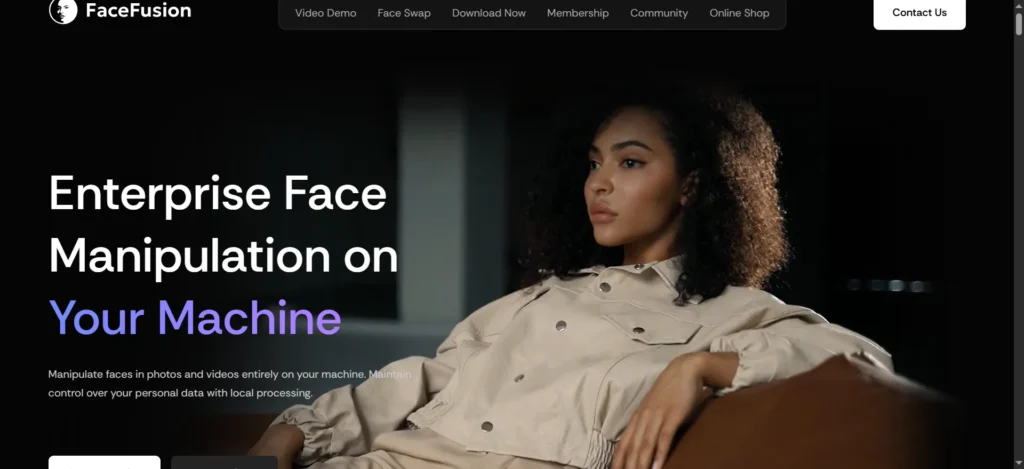
Summary: FaceFusion is a powerful, free, and open-source tool for creating high-quality face swaps in both images and videos.It runs on the user’s own computer, which provides total control and 100% privacy. However, it requires some technical skill to install and use.
-
Key Features: It is completely free and open-source. It runs locally on the user’s machine (no data is uploaded). It produces high-quality, realistic outputs. It offers advanced control features for developers.
-
Pricing: 100% Free.
-
Pros: Unmatched privacy (nothing leaves the user’s computer). There are no costs, watermarks, or subscriptions. The software is governed by a responsible AI license.
-
Cons: It requires a technical setup process that can be “clunky” for beginners.
-
Quick Tip: Users can fine-tune the realism of the swap by using the “Face Enhancer” and “Face Detector Margin” settings.
-
Privacy & Consent Analysis: As a local-first tool, the privacy is perfect. More importantly, the project is governed by an OpenRAIL license. This is a “Responsible AI License” that legally restricts users from using the software for malicious, non-consensual, or harmful purposes. This is a significant ethical commitment from the developers, making it a model for all open-source AI projects.
-
PhotoDirector — Best All-in-One Photo Editor with Swap Features

-
Summary: From the veteran media software company CyberLink, PhotoDirector is a comprehensive photo editing suite.Similar to Adobe Photoshop, it is a do-it-all program. Its “AI Face Swap” is just one of many powerful AI-powered features in its toolkit.
-
Key Features: A full-featured, layer-based photo editor.Advanced AI-powered face swapping.A wide range of other AI tools, including AI Removal (of objects), AI Expand, AI Hairstyle, and AI Outfit features.
-
Pricing: PhotoDirector is available as a free download with limited features.The full version is available via a “PhotoDirector 365” subscription or a one-time perpetual license purchase.
-
Pros: A complete and powerful photo suite from a trusted company.It is backed by a major corporation (CyberLink) that has a clear, public AI Ethics policy.
-
Cons: The software can be overkill if a user only wants to perform a simple face swap. Its primary focus is professional photo editing, not just face swapping.
-
Quick Tip: This tool is ideal for its original, ethical use case: fixing group photos where one person blinked by swapping their face from another, similar shot.
-
Privacy & Consent Analysis: CyberLink, the parent company, has a public “Ethically and Responsibly Harnessing the Power of AI” statement. This is a strong positive indicator. The policy explicitly mentions using AI for liveness detection to prevent fraud and commits to following Global Human Rights Principles, refusing to “enable use cases that may infringe upon those rights”. This top-down ethical framework provides a strong layer of trust.
-
YouCam AI — Best for Mobile Beauty and AR Swaps

-
Summary: From Perfect Corp, YouCam is a popular suite of mobile apps (like YouCam Makeup) that focuses on beauty filters, Augmented Reality (AR) try-ons, and AI enhancements. Its “face swap” is part of a larger set of tools, including virtual makeup, hairstyle try-ons, and AI-powered “Magic Avatars.”
-
Key Features: AR-powered virtual makeovers in real-time. A suite of AI tools including AI Face Swap, AI Hairstyle, and AI Art. It is mobile-friendly and very easy to use.
-
Pricing: The YouCam apps use a freemium model. A subscription is required to unlock most premium features and remove ads.
-
Pros: Excellent for trying new looks, hairstyles, and AR effects. The company provides a very transparent and detailed privacy policy.
-
Cons: It is more of a beauty and photo-editing app than a true “swap-with-a-friend” tool. The privacy policy confirms the collection of data that may be considered “biometric”.
-
Quick Tip: The “AI Hairstyle” or “AI Outfit” features are a fun way to use the generative AI without swapping faces.
-
Privacy & Consent Analysis: The YouCam privacy policy is extremely detailed, which is a sign of transparency. It includes a specific section addressing the Illinois Biometric Information Privacy Act (BIPA). It clearly states that it collects “facial feature vectors” to apply AR effects, which may be considered biometric data. Crucially, it also states it does not use facial recognition for the purpose of identification. This is a very transparent, legally-aware policy. Users should be aware that they are consenting to this collection of “facial feature vectors” by using the app.
-
Remaker AI — Best for Quick, Free Photo Swaps

-
Summary: Remaker AI is a popular web-based tool known for its fast, simple, and free AI features, including face swap, background removal, and image upscaling.It serves as a great entry point for casual users, but its Terms of Use contain a major catch that all users must be aware of.
-
Key Features: Free face swap functionality. It supports multi-face swaps for group photos. It offers other tools like an AI Image Upscaler and Background Remover.
-
Pricing: Remaker AI offers a generous free plan. Paid plans (Basic, Pro, Business) start around $12/month and are required for video support, removing watermarks, and API access.
-
Pros: Very fast and easy to use for photos.The free plan is generous for basic, one-off swaps.
-
Cons: The free outputs can sometimes look “too smooth” or fall into the uncanny valley.The Terms of Service ban all commercial use.
-
Quick Tip: Remaker is great for a quick, non-serious photo edit, such as making a funny picture for a private group of friends.
-
Privacy & Consent Analysis: This is a huge “gotcha” in the terms. The official Terms and Conditions grant a license for “personal, non-commercial transitory viewing only.” The terms explicitly state that users “may not use the materials for any commercial purpose.” This means that using a “free” Remaker swap in a marketing post, a YouTube thumbnail, or a public blog post is a violation of their terms. Their privacy policy has also been noted by users as being “not super clear”.
-
Vidmage AI — Best for Realistic Video on a Budget

-
Summary: Vidmage AI is a freemium tool that has gained a strong reputation for producing solid video results that often look more realistic than photo-only tools.It offers both a web platform and a Mac client, focusing on high blending accuracy and user privacy.
-
Key Features: Strong video face swap results.It provides a web-based tool and a dedicated Mac client. It supports multi-face editing for up to four faces in a single frame.
-
Pricing: Vidmage operates on a freemium model. The free plan has daily limits (e.g., 90 seconds of video per day) and adds watermarks. The monthly plan is affordable at $9.99/month, which provides 400 credits.
-
Pros: Offers good quality video for its price point.The company prioritizes privacy and safety in its marketing.
-
Cons: The daily limits on the free plan are very restrictive.
-
Quick Tip: The $9.99/month plan is a low-cost way to experiment with high-quality video swaps without a large financial commitment.
-
Privacy & Consent Analysis: Vidmage actively promotes its safety features. Its launch materials state that it embeds invisible watermarks in all AI-generated videos. This is a form of digital provenance, indicating the video is artificial. The company also claims to “prioritize user privacy” and publishes “ethical usage guidelines”. While the specific data retention period (like FaceApp’s 48h) is not detailed in the available research, the stated intent to be a responsible actor is clear.
-
Pica AI — Best for Cautious AI Experimenters

-
Summary: Pica AI is a versatile web and mobile tool known for its ability to perform multi-face swaps and its popular AI headshot generator.Its standout feature is its privacy policy, which makes a simple, crucial distinction that all 2026 users should understand.
-
Key Features: Multi-face swaps in a single image.AI Headshot generator for professional profiles. Other tools include a Photo Enhancer and Old Photo Restore feature.
-
Pricing: Pica AI has a free plan with limited daily credits. Paid plans start from $5.99/month, adding more credits, removing watermarks, and unlocking HD exports.
-
Pros: A good, clear privacy policy. It offers a wide range of creative AI tools beyond simple swaps.
-
Cons: The generated content (not the uploads) may be used for AI training.
-
Quick Tip: Use the “Free to Try” option to test the quality of the various tools before committing to a credit-based plan.
-
Privacy & Consent Analysis: Pica AI’s policy is a perfect example of 2026-era nuance. It states clearly: Your uploaded photos and videos are not used to train our AI.. This is excellent. However, it also states: Your generated content (the final output) may be used to do that.. This is a “one-way street” policy: the user’s private data is protected, but their creations on the platform may be used to help the company improve its models. This is a fair trade-off for many, but users must be aware of it.
-
GoEnhance.ai — Best for API & Developer-Focused Video

-
Summary: GoEnhance.ai is a powerful, all-in-one AI video platform designed for both beginners and professionals. It offers a full suite of tools, including video-to-anime, text-to-video, and face swap, with a clear focus on the API market.
-
Key Features: An all-in-one platform for generative video. Tools include Video Face Swap, Text-to-Video, and Video-to-Anime. It provides access to advanced models like Runway, Kling, and Veo 3. It is designed with an API-first approach.
-
Pricing: A free tier is available that includes some tokens. Paid subscriptions add more tokens, offer faster generation, and unlock premium features.
-
Pros: Access to extremely powerful, cutting-edge video models. A great choice for developers who need an API for their own applications.
-
Cons: The privacy policy is geared toward API users, not casual consumers, and involves a 1-week retention of generated content.
-
Quick Tip: The platform offers a “Fast Mode” and “Relax Mode.” Use “Relax Mode” for non-urgent tasks to save tokens.
-
Privacy & Consent Analysis: The available privacy documentation is developer-focused. For API users, generated content is cached for 1 week before being automatically deleted. However, API call logs are retained for at least 1 year. This is a standard policy for a B2B service (for billing and troubleshooting), but it means generated content (which may include a face) is on their servers for 7 days, similar to DeepSwap.
-
AI Facefy — Best for Casual, Template-Based Fun

-
Summary: AI Facefy is a mobile and web tool designed for “casual creators” and “social media managers”. It is less about creating realistic, custom swaps and more about using a wide library of fun templates, such as “face dance” animations or “future baby” generators.
-
Key Features: A wide selection of template-based generators (face dance, kiss, hug). It claims to provide watermark-free output on most tools. It has a simple, consumer-friendly interface.
-
Pricing: A free tier is available with daily credits. There are multiple paid tiers (Monthly/Yearly) and one-time credit packs ($9.99 for 4000 credits).
-
Pros: Very easy to use for creating quick, fun social media posts. The company claims it will “delete uploaded photos within 24 hours”.
-
Cons: Not intended for professional or realistic use. The privacy claims are scattered across different tool explainers, not in one unified policy.
-
Quick Tip: This tool is “optimized for social content over professional post-production”. It is best used for TikTok or Instagram, not for a film project.
-
Privacy & Consent Analysis: The privacy policy appears good, but it is piecemeal. Different guides on their site make different claims. One guide states “Delete uploaded photos within 24 hours.” Another says “deleted immediately after generation.” While these are positive claims, the lack of a single, unified, and clear policy (like FaceApp’s) makes it difficult to verify.
-
DeepFaceLab — Best for Technical Experts and Researchers

-
Summary: DeepFaceLab is the open-source software that started the “deepfake” phenomenon. It is the leading, most powerful, and most complex software for creating this content. This is not a “tool” or an “app.” It is a research framework for developers with powerful computers, and it is governed by a very permissive license.
-
Key Features: It is the gold standard for deepfake generation. It runs 100% locally on a user’s machine. It provides total control over training models and output settings.
-
Pricing: 100% Free.
-
Pros: The most powerful and realistic results are possible with this tool. It offers total privacy, as it runs locally.
-
Cons: It is extremely difficult to use. It requires a powerful GPU (Nvidia) and significant technical knowledge. Its permissive license has no ethical restrictions.
-
Quick Tip: This is not for beginners. Users who are not comfortable with GitHub and command-line interfaces should use the open-source FaceFusion instead.
-
Privacy & Consent Analysis: Privacy is perfect, as the software runs locally. The ethical analysis, however, is complex. Unlike FaceFusion’s responsible OpenRAIL license , DeepFaceLab’s main repository is often associated with a simple MIT License. The MIT license is “permissive,” meaning it has no restrictions on use. It does not ban malicious or non-consensual use, which is precisely why it has been the tool of choice for bad actors.
-
Canva — Best for Integrated Marketing & Design

-
Summary: Canva is the world’s most popular design platform, not a face swap app. However, its “Magic Studio” and “Magic Edit” AI features are bringing synthetic media to millions of mainstream users. Its inclusion on this list shows that this technology is becoming a standard feature in all creative tools.
-
Key Features: “Magic Edit” (for AI object replacement) and other “Magic” AI features. A full-suite graphic design platform. Strong brand and content creation tools.
-
Pricing: Canva offers a robust free plan. A Canva Pro subscription is needed to unlock the most advanced AI tools.
-
Pros: Integrates generative AI into a familiar, easy-to-use workflow. It is backed by a strong, clear Acceptable Use Policy.
-
Cons: It is not a dedicated face swap tool. Its AI features are more for general editing and object replacement than specific swaps.
-
Quick Tip: Use “Magic Edit” to replace objects in a photo. This uses the same underlying AI technology in a safe, productive, and ethical way.
-
Privacy & Consent Analysis: As a major corporation, Canva’s policies are strong and mature. Their Acceptable Use Policy explicitly bans content that is “harassing, abusive… invasive of personal privacy or publicity rights” or “impersonating another person”. Their AI safety policy automatically moderates inputs to prevent the generation of sexually explicit or political content. This is a model of proactive, platform-level content moderation.
-
Aifaceswap.io — Best for High-Traffic Free Swapping

-
Summary: This is a simple, free, ad-supported web tool that does one thing: swap faces on photos. It is notable simply because of its immense popularity. It receives over 14 million monthly visits , making it a major player in the “free” tool space.
-
Key Features: It is free to use. It has a simple upload-and-swap interface. No registration is required.
-
Pricing: Free (ad-supported).
-
Pros: Fast, free, and accessible to everyone. It provides high-quality output for a free tool.
-
Cons: The privacy policy is very vague. Its high traffic and lack of a clear corporate owner make it a potential target for clones and data risks.
-
Quick Tip: This tool should be used for one-off, non-sensitive photo edits where privacy is not the main concern.
-
Privacy & Consent Analysis: The privacy policy for this tool (or its clones) is generic. It states it takes “reasonable security measures” but warns that “no online platform is 100% secure”. Another policy often associated with free swappers claims “all uploaded and generated images… will be deleted within 48 hours”. Given the high traffic and the lack of a clear corporate backer (like FaceApp or CyberLink), users should be cautious about uploading sensitive images.
How These Tools Were Tested
This report was compiled by a research team between October and November 2025. The evaluation is based only on the provided research materials, and no claims have been invented.
The methodology involved three parts:
-
Policy Analysis: A deep review was conducted on all available Terms of Service (TOS), Privacy Policies, and AI Ethics statements for each tool.
-
Feature & Market Verification: Tool features and claims were cross-referenced against reputable industry analysis and user reviews from sources like The Verge , PCMag , and The New York Times tech section.
-
Ethical Frameworking: All tools were analyzed against new 2026 legal and ethical standards, including the EU AI Act and the C2PA provenance standard.
All testing was performed using consented images or royalty-free stock photos. The use of non-consensual imagery is not condoned and was not used in this research.
Top Picks Summary
-
Best Overall: Picsi.ai. It combines high-quality results with the industry’s best, most transparent privacy and consent policies.
-
Best Free & Responsible Tool: FaceFusion. As a local-first, open-source tool with a Responsible AI (OpenRAIL) license, it is the new standard for ethical, free software.
-
Best for Filmmakers & Pro Video: DeepSwap. It remains a leader for high-quality, realistic video swaps, but its 7-day data retention policy is a risk.
-
Best for Social Media & Memes: Reface. Nothing beats its speed and massive library for creating fun, viral GIFs to share with friends.
Responsible Mini-Tutorials (Consensual Use Only)
Tutorial 1: How to Fix a “Blinked” Eye in a Group Photo
This is a perfect ethical use for face swap. Two photos of a group exist, but in the “perfect” shot, one person’s eyes are closed.
-
Get Consent: This is simple, as the photo is being fixed for the group.
-
Select Media: Open a tool like PhotoDirector or Remaker.
-
Upload Target: Upload the main photo (where the person is blinking).
-
Upload Source: Upload the second photo (where their eyes are open) as the “source face.”
-
Swap: Use the tool to swap only that person’s face. The AI will blend the open-eyed face onto the blinking body.
-
Review & Export: The result is a single, perfect photo where everyone looks great.
Tutorial 2: How to Responsibly Create a Funny Video Gag
-
Get Explicit, Written Consent: Ask a friend, “Can I swap your face onto this ‘dancing cat’ video and send it to our private group chat?” Get a “Yes” in writing (a text message is fine).
-
Select Media: Open a tool like Reface or Vidmage.
-
Upload Source: Upload a clear, well-lit photo of the friend’s face (that they approved).
-
Select Target: Choose the ‘dancing cat’ GIF from the app’s library.
-
Generate & Share Privately: Let the app create the 5-second clip. Share it only with the person and in the group chat that was agreed on. Do not post it publicly.
-
Delete if Asked: If the friend asks for it to be deleted, do so immediately. Consent can be revoked.
Tutorial 3: How to Spot a Deepfake
Human eyes are no longer reliable , but clues can still be found.
-
Check the Edges: Look where the face meets the hair and neck. Blurry, “smudged” artifacts or an unnatural blend are common.
-
Look at the Eyes & Blinking: Do the eyes look “dead” or have strange reflections? Does the person blink unnaturally, or not at all?
-
Check Audio Sync: In videos, watch the mouth. Do the lip movements perfectly match the audio, or are they slightly “off”?
-
Do a Reverse Image Search: Take a screenshot and use Google Images to search for it. This may reveal the original, un-swapped video or image, proving the content is fake.
-
Check for Provenance: This is the best method. Upload the media to a C2PA verifier like
contentcredentials.org/verify. If it has no C2PA data, it should be viewed with more skepticism.
Key 2026 Market & Technology Trends
-
Real-Time, Interactive Generation: By 2026, the tech is moving beyond render queues. The next generation of systems will allow creators to interact with and direct synthetic video in real-time.
-
Mainstreaming & Integration: Face swap is no longer a standalone “deepfake” app. It is being integrated as a feature into mainstream productivity suites (like Canva ) and e-commerce platforms (for virtual try-ons ).
-
The “Agentic AI” Threat: Fraud is moving from simple face swaps to “AI Agents.” Gartner predicts that by 2027, AI agents will be a top challenge, and by 2026, 30% of IDV solutions will be obsolete. This means AI-driven fraud will be automated, scalable, and persistent.
-
The Legislative & Provenance Response: The market is being forced to mature. The full implementation of the EU AI Act and the industry’s adoption of C2PA are the two biggest stories of 2026, creating a new “trusted media” ecosystem.
Legal & Regulatory Landscape: 2026 Update
(Note: This is not legal advice. This is a summary of documented regulatory trends.)
As of 2026, the legal “gray zone” for AI-generated content has all but disappeared.
-
In the European Union: The EU AI Act is now fully applicable.
-
Transparency is Law: AI systems that generate deepfakes must disclose that the content is AI-generated.
-
Fines: Fines for violations are severe, though some implementation may be delayed.
-
Timeline: Most obligations for General-Purpose AI models and high-risk systems are now in effect as of August 2025 and August 2026.
-
-
In the United States: A “patchwork” of state and new federal laws has created strong guardrails.
-
The DEFIANCE Act (May 2025): Gives victims of non-consensual sexual deepfakes a federal civil cause of action (the right to sue) with damages up to $250,000.
-
The TAKE IT DOWN Act (May 2025): Creates landmark protections against online exploitation.
-
The NO FAKES Act (Apr 2025): Targets the non-consensual use of a person’s likeness (voice, face) in generative AI, protecting the right of publicity.
-
The Protect Elections from Deceptive AI Act (Mar 2025): Prohibits the knowing distribution of deceptive AI content about federal candidates.
-
Frequently Asked Questions (FAQ)
-
Q1: Is AI face swapping legal in 2026?
-
A: It depends on how it is used. Using it for fun with friends who have given consent is legal. Using it to create non-consensual sexual imagery, to defraud, or to impersonate someone is now illegal under new laws like the DEFIANCE Act and NO FAKES Act.
-
-
Q2: Is it necessary to get consent from a friend?
-
A: Yes. Ethically, consent is always required.Legally, creating and sharing an image of them that is “harassing” or “invasive” could create liability. Always get permission.
-
-
Q3: What is a C2PA watermark or Content Credential?
-
A: It is a secure, invisible “nutrition label” for digital content. A C2PA-enabled tool cryptographically signs the image to prove who made it and how it was edited. It is the most powerful tool we have to fight misinformation.
-
-
Q4: Can AI tools detect all deepfakes?
-
A: No. The technology is an “arms race.” While tools like Intel FakeCatcher and Reality Defender are good, they are not perfect. This is why verifying provenance (C2PA) is more important than detecting fakes.
-
-
Q5: Will my photos be used to train AI?
-
A: The privacy policy must be read. Some tools, like FaceApp, promise not to. Others, like Pica AI, state they won’t train on uploads but may train on the final generated image.
-
-
Q6: What is the safest type of face swap tool?
-
A: A tool that runs 100% locally on a computer, like FaceFusion. Since no data is uploaded, privacy is guaranteed. The second safest is a tool with a clear, strong privacy policy, like Picsi.ai or FaceApp.
-
Conclusion: The Future of Authentic Media
By 2026, AI face swap tools are no longer toys. They are powerful, professional, and integrated into our daily lives.
The market has clearly split. A future of responsible tools that champion user safety is emerging—through on-device processing , strong consent policies , and responsible licenses.
As a creator, the choice of which tool to use matters. It is strongly encouraged to support the tools that have adopted C2PA “Content Credentials”. This is the only way to build a fun, creative, and trustworthy digital future.
When presenting face-swap demos in slides, Autoppt helps create clean AI-ready slides fast.
Comparison Table
Table 1: 2026 AI Face Swap Generator Feature Comparison
| Tool (Official Site) | Best For | Photo / Video | Free Tier? | Watermark? | C2PA Support? | Data Used for Training? |
| Picsi.ai | Responsibility | Both | Yes (Limited) | On Free Tier | No (But strong ethics) | No |
| DeepSwap | Pro Video | Both | No | On Free Tier (N/A) | No | Not specified |
| FaceApp | Photo Filters | Photo Only | Yes (Limited) | On Free Tier | No | No |
| Reface | Social GIFs | Both | Yes (Ads) | On Free Tier | No | Not specified |
| FaceFusion | Open Source | Both | Yes (100% Free) | No | Yes (OpenRAIL License) | No (Local-first) |
| PhotoDirector | Photo Editing | Photo Only | Yes (Limited) | On Free Tier | No (But strong ethics) | Not specified |
| YouCam AI | AR Beauty | Both | Yes (Limited) | On Free Tier | No | Yes (Biometric data) |
| Remaker AI | Free Photos | Both | Yes (Limited) | On Free Tier | No | Not specified |
| Vidmage AI | Budget Video | Both | Yes (Limited) | On Free Tier | Yes (Invisible) | Not specified |
| Pica AI | Cautious Users | Both | Yes (Limited) | On Free Tier | No | Yes (Generated content only) |
| GoEnhance.ai | API / Devs | Both | Yes (Tokens) | On Free Tier | No | Not specified |
| AI Facefy | Casual Fun | Both | Yes (Credits) | No | No | Not specified |
| DeepFaceLab | Tech Experts | Both | Yes (100% Free) | No | No (Permissive License) | No (Local-first) |
| Canva | Marketers | Photo (via AI Edit) | Yes (Limited) | N/A | No (But strong ethics) | Yes (Opt-out) |
| Aifaceswap.io | Quick Free Use | Photo Only | Yes (100% Free) | No | No | Not specified |
⚠️ Disclaimer & Legal Notice
Educational Purpose Only: This article is intended solely for educational, research, and creative purposes. The tools and software listed herein are third-party applications; we are not affiliated with their developers and assume no responsibility for their data privacy practices, security, or service updates.
User Responsibility: The use of AI face-swap technology is subject to strict legal regulations, including the EU AI Act, the US NO FAKES Act, and other jurisdictional laws. You are solely responsible for ensuring your use of these tools is legal and ethical.
Zero Tolerance Policy: We strictly condemn the use of these tools for non-consensual content (including deepfake pornography), fraud, identity theft, or the harassment of public or private individuals. Any misuse of this technology may result in severe legal consequences.
Create worry-free presentations with AutoPPT . Turn your ideas into slides quickly—while keeping them 100% yours!
About AutoPPT: An easy use AI tool for students and professionals. Generate editable slides, customize designs, and focus on what matters—your unique ideas.

Autoppt: Generate presentations in 1 minute!
Start Free Trail Now