


Michael Anderson
Former journalist turned tech writer with a passion for helping professionals enhance productivity through AI.
Introduction: The Presentation Landscape of 2026
The End of the Blank Page
If we were to look back at the corporate and academic landscape of the early 2020s, we would see a world defined by a specific kind of digital anxiety: the tyranny of the blank slide. For decades, the process of creating a presentation was a manual, labor-intensive marathon. It involved a disjointed workflow of staring at a white screen, wrestling with clunky formatting toolbars, hunting for royalty-free images that didn’t look staged, and spending hours—sometimes days—aligning text boxes by hand. The intellectual labor of crafting a narrative was often overshadowed by the menial labor of pixel management.
By 2026, however, this paradigm has shifted entirely. We have entered what industry analysts call the “Prompt-to-Product” era. The expectation for speed, quality, and narrative coherence has skyrocketed. Professionals, students, and educators no longer ask, “How do I make this slide look good?” Instead, they ask, “Which AI intelligence can tell my story best and fastest?” The blank page is no longer a hurdle; it is a relic.
In this mature AI landscape, the market has bifurcated. On one side, we have generalist Large Language Models (LLMs) that can write text but struggle with visual spatialization. On the other, we have specialized “AI Presentation Engines” that understand the unique grammar of a slide deck—the balance of whitespace, the hierarchy of bullet points, and the visual impact of data.
The Two Contenders
Among the crowded field of intelligent design tools, two names have risen to dominate the conversation in 2026: Autoppt and AI PPT (aippt.com). Both platforms promise to banish the “blank page syndrome” forever. Both claim to save users hours of tedious work. Both boast impressive generative AI capabilities that can transform a simple text prompt, a Word document, or a PDF into a fully visualized deck in minutes.
However, for the user standing at the crossroads—whether a university student rushing to finish a thesis defense or a marketing executive preparing a quarterly business review—deciding which tool to integrate into their daily workflow can be confusing. The feature sets overlap, the marketing language is similar, and the promises of “instant results” are ubiquitous.
The Purpose of This Report
As a senior editor at Autoppt, I have spent years analyzing the nuances of productivity software, specifically tracking the evolution of AI in the workplace. While I represent Autoppt, the goal of this comprehensive, 15,000-word report is not to sell, but to educate. In 2026, the user is sophisticated. You do not need marketing fluff; you need a deep, honest, and exhaustive comparison of the underlying mechanics of these tools.
This report will walk you through a granular comparison of these two powerhouses. We will look beyond the flashy landing pages and dive into the real-world functionality of each platform. We will explore how they handle template architecture, how their AI engines interpret complex data, how they manage workflow friction, and ultimately, which one offers the best value for specific user personas in the modern digital economy.
We will analyze the “Generic Trap”—the tendency of AI to produce bland content—and see which tool offers the best escape route. We will examine the “Efficiency Equation” to calculate the actual Return on Investment (ROI) for adopting these tools. By the end of this document, you will have a nuanced understanding of where AI PPT shines, where Autoppt excels, and which tool deserves a place in your 2026 toolkit.
Part 1: What Is Autoppt?
To understand the comparison, we must first deeply understand the contenders. We begin with an extensive analysis of Autoppt, dissecting its philosophy, its engine, and its place in the market.

The Core Philosophy: “Content-First” Speed
At its heart, Autoppt is engineered around a single, driving philosophy: Efficiency is the ultimate currency. In the hyper-accelerated work environment of 2026, the time spent fiddling with slide transitions is time lost on strategic thinking. Autoppt is designed to be the ultimate time-saver, removing the friction between having an idea and seeing it visualized.
Unlike legacy software that treats the user as a designer, Autoppt treats the user as a director. The user provides the intent—the topic, the document, the raw data—and Autoppt’s AI acts as the production team, handling the execution instantly. The tool positions itself not just as a slide maker, but as a holistic “content-to-visual” platform. It understands that a beautiful slide is useless if the content is incoherent. Therefore, it places a heavy emphasis on its AI writing capabilities, tuned to generate comprehensive, logically structured arguments rather than just filling space with generic placeholders.
Deep Dive into Key Features
-
High-Volume AI Slide Generation

The flagship capability of Autoppt is its generative engine. While many competitors in 2026 still struggle to produce more than 5-10 slides at a time without losing coherence, Autoppt is renowned for its ability to generate substantial decks—often 20 to 30 slides in a single pass.
This “High-Volume” capability is critical for serious work. A 5-slide deck is a pitch; a 25-slide deck is a report. By generating a full structure—Introduction, Problem Statement, Methodology, Data Analysis, Strategic Implications, Conclusion—Autoppt provides the user with a “Meaty Draft.” It is far easier to delete three slides you don’t need than to force the AI to generate ten new ones from scratch. This feature alone fundamentally changes the workflow, moving the user immediately into the “Review and Refine” phase rather than the “Creation” phase.
-
The “Magic” of Document Conversion (Doc-to-Deck)
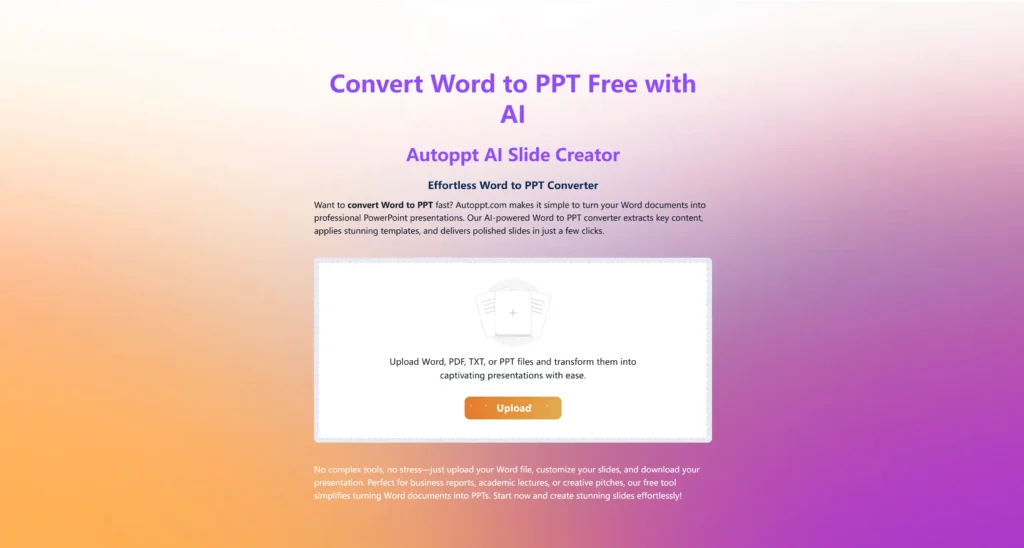
In the corporate and academic worlds, presentations rarely start from nothing. They start from existing knowledge: a 50-page PDF research paper, a quarterly Word document report, or a comprehensive project brief. Manually transferring this knowledge to PowerPoint is a process rife with friction and copy-paste errors.
Autoppt’s Document-to-Presentation engine is a standout feature designed to solve this specific pain point. Users can upload PDF or Word files directly into the system. The AI does not simply scrape the text; it performs a semantic analysis. It identifies the core thesis, extracts the supporting arguments, summarizes the data points, and maps them to appropriate slide layouts. This capability, often referred to as “Doc-to-Deck,” effectively turns a reading artifact into a viewing artifact in seconds, preserving the logical flow of the original document.
-
Integrated AI Mind Mapping
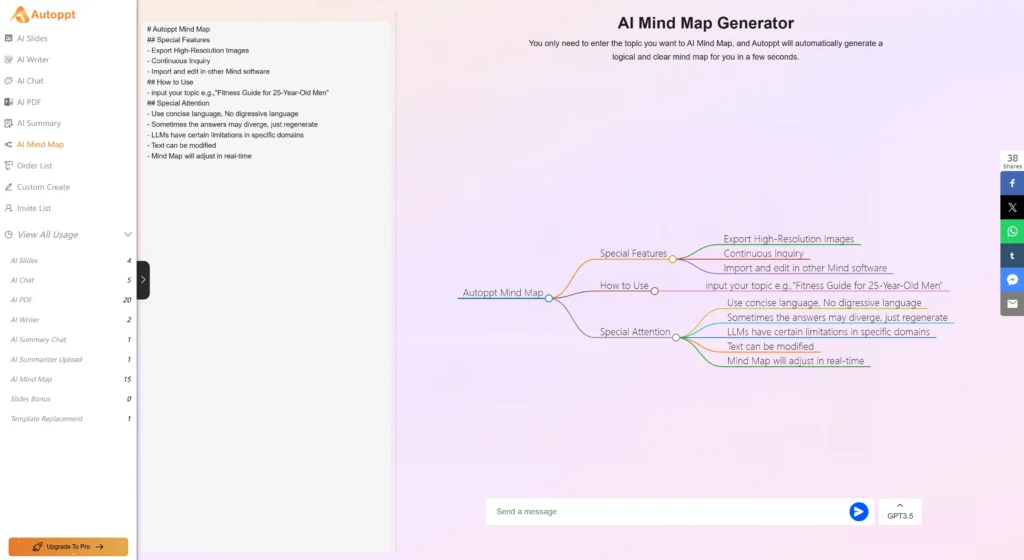
Perhaps the most unique differentiator in Autoppt’s arsenal is its integrated Mind Map generator. Most presentation tools assume the user already knows the structure of their talk. Autoppt recognizes that structuring is often the hardest part.
With a single click, users can generate a visual mind map from their topic. This feature bridges the gap between brainstorming and presentation. It allows the user to see the hierarchy of their ideas—the main branches and sub-branches—before a single slide is created. This “visualize first” approach ensures that the final deck has a strong logical backbone. It is a tool for thinking, not just for making.
-
The “One-Click” Ecosystem
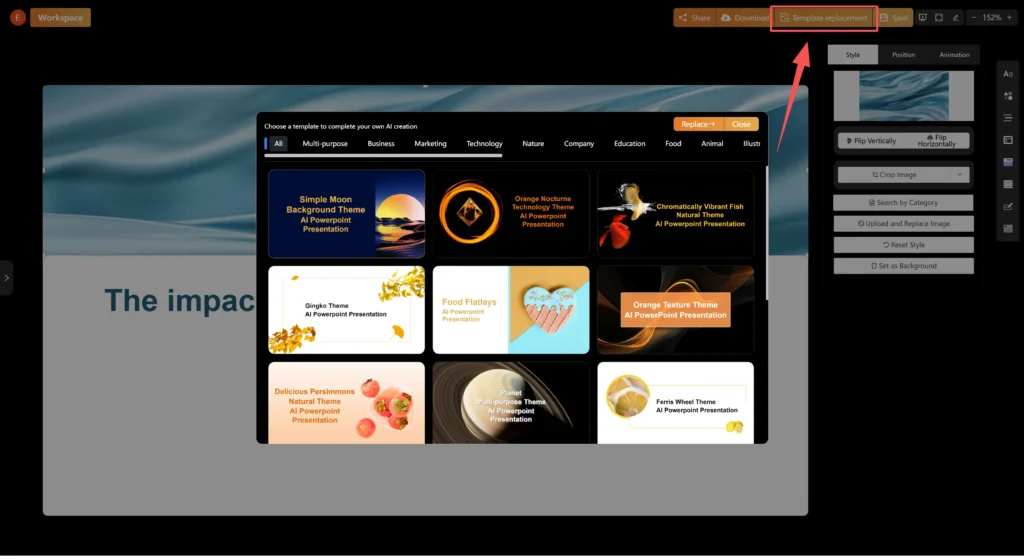
Autoppt focuses heavily on reducing “Click Fatigue.” The interface is designed to minimize the number of decisions a user has to make to get a result.
-
One-Click Template Switching: Users can instantly transform the entire aesthetic of a presentation—fonts, color palettes, background assets—by selecting a new theme. The AI automatically reflows the content to fit the new design, ensuring that text doesn’t overlap or break.
-
Smart Chart Generation: For users on the Unlimited plan, Autoppt offers the ability to generate charts within the presentation, visualizing data points automatically.
-
Global Accessibility
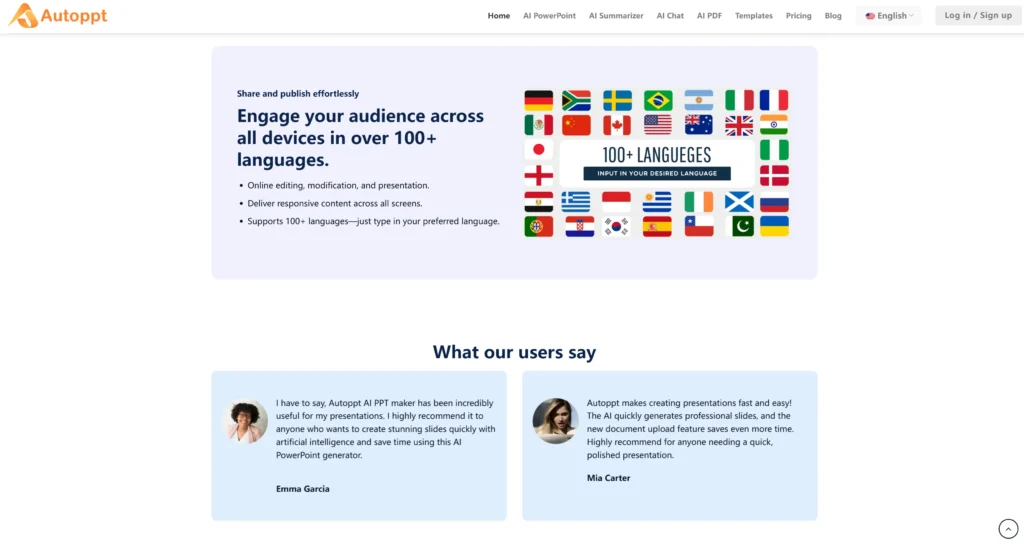
Recognizing the decentralized nature of modern teams, Autoppt supports over 100 languages. This is not just translation; it is generation. A user can input a prompt in French and request the output in English, or vice versa. This capability breaks down linguistic barriers, allowing global teams to collaborate seamlessly and ensuring that non-native speakers can produce native-level presentations.
Pricing and Accessibility Model
Autoppt operates on a “Freemium” model designed to be accessible to students while scalable for enterprise users.
-
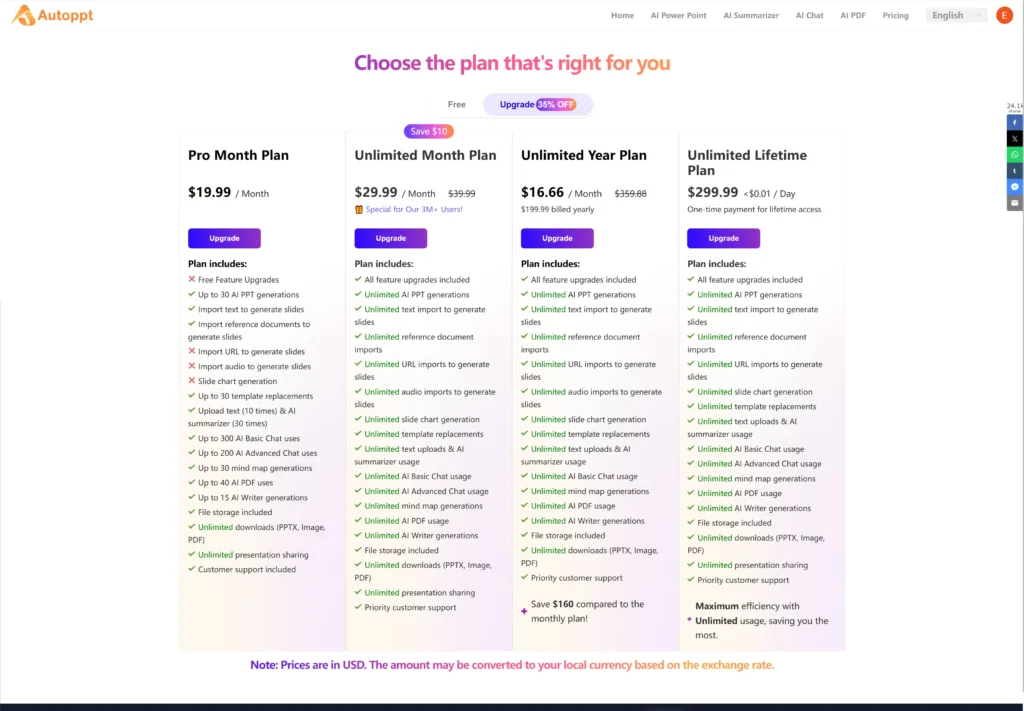
Free Plan: Offers a generous entry point, allowing 1 full AI presentation generation, 15 AI mind maps, and limited PDF processing.
-
Pro Plan ($19.99/mo): Unlocks the standard professional suite with storage and support.
-
Unlimited Plan ($39.99/mo): The power-user tier, removing limits and adding advanced charting capabilities.
-
Note: Entry pricing is sometimes cited as starting from $12.49/mo depending on annual billing cycles.
Part 2: What Is AI PPT (aippt.com)?

Now, we turn our analytical lens to the challenger: AI PPT. Found at aippt.com, this tool has carved out a significant market share by positioning itself as a comprehensive, resource-rich alternative to the traditional Microsoft PowerPoint ecosystem.
The Core Philosophy: “Variety and Visuals”
If Autoppt is the “Speed and Structure” specialist, AI PPT is the “Library Giant.” Its philosophy is built on the idea of choice. In 2026, visual differentiation is key. Users are terrified of their presentations looking “like AI.” AI PPT combats this by offering an overwhelming abundance of visual assets, aiming to ensure that no two presentations look exactly alike.
The tool prides itself on mimicking the flexibility of traditional PowerPoint—giving users granular control over elements—while supercharging the process with AI. It appeals to the user who enjoys the process of design but wants a faster engine to drive it.
Deep Dive into Key Features
-
The Massive Template Repository
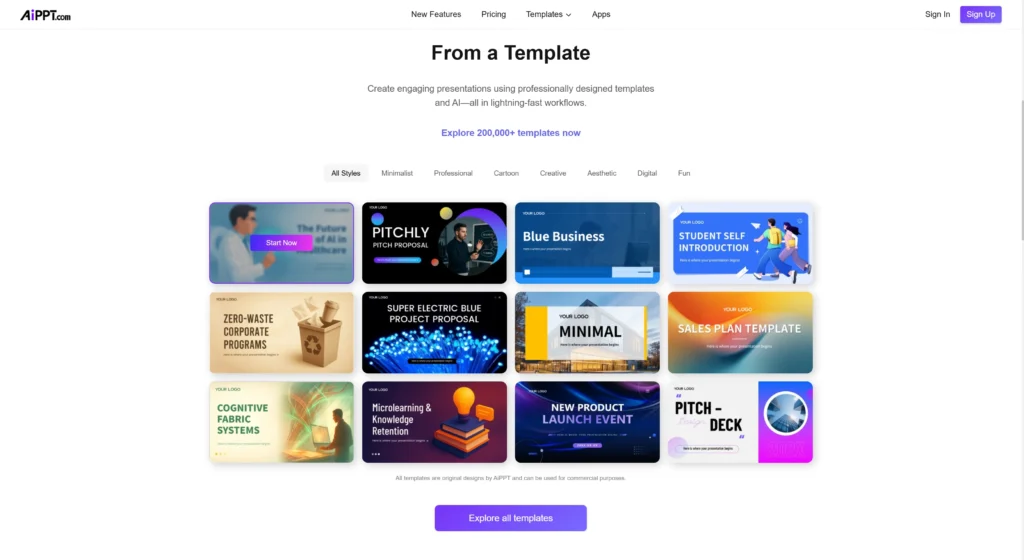
The most headline-grabbing statistic for AI PPT is the sheer volume of its library. The platform claims access to over 200,000 designs and templates. This is an order of magnitude larger than most competitors.
This “Ocean of Options” approach means that for any specific niche—whether it is “Crypto-zoology,” “Neo-Brutalist Architecture,” or “Kindergarten Pedagogy”—there is likely a template that fits that exact visual vibe. For users who prioritize specific aesthetic matching over speed, this library is a massive draw. It functions almost like a stock asset site integrated directly into the creation tool.
-
Smart Outline and Interactive Generation
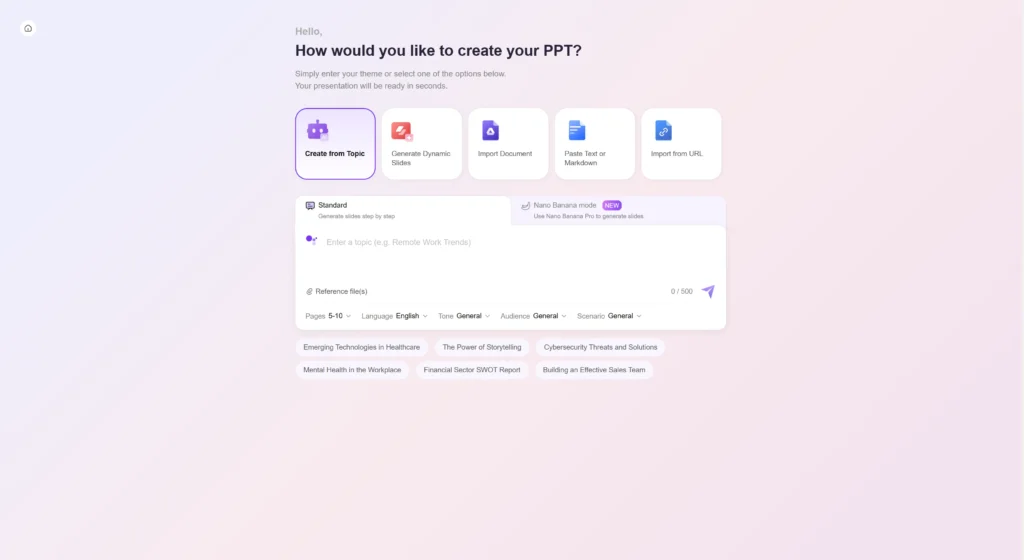
AI PPT utilizes a “Smart Outline” approach to generation. Rather than a “black box” where you type a prompt and get a deck, AI PPT often encourages an intermediate step. You chat with the AI to generate an outline, review the headers and bullet points, and then confirm the generation.
This interactive layer allows for pre-generation quality control. It mimics the workflow of a manager reviewing a subordinate’s plan before giving the green light. For users who have a very specific narrative flow in mind and want to ensure the AI adheres to it, this “Smart Outline” feature provides a comforting level of control.
-
Diverse Input Ecosystem
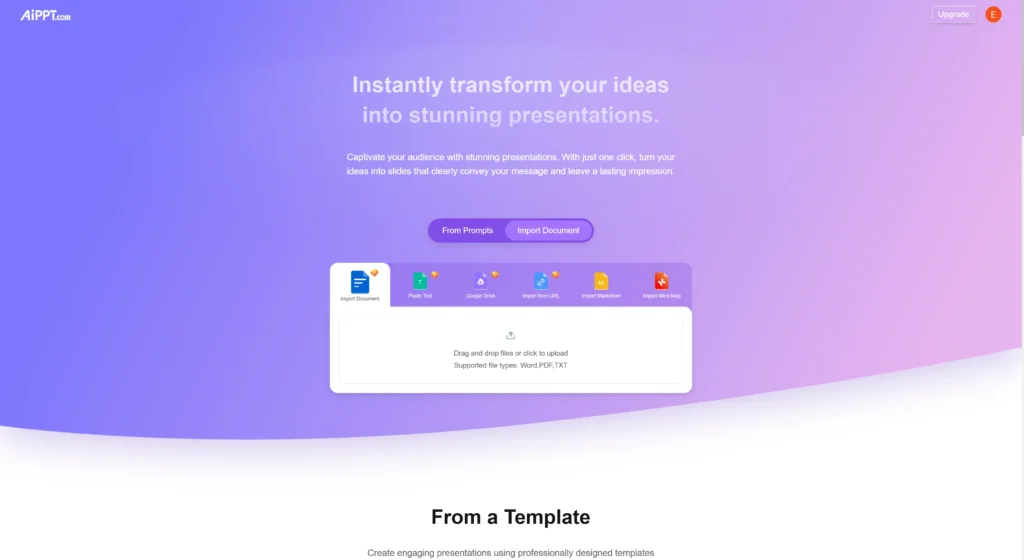
AI PPT is designed to be highly versatile in how it ingests information.
-
Multi-Format Support: It accepts Word, PDF, TXT, and notably, URLs. The ability to paste a website link and have the AI scrape it for a presentation is a powerful feature for marketing teams analyzing competitors or summarizing web content.
-
Cloud Integration: It integrates with Google Drive, allowing users to pull documents directly from their cloud storage without downloading them first. This reduces friction for users deeply embedded in the Google Workspace ecosystem.
-
Rich Visual Elements
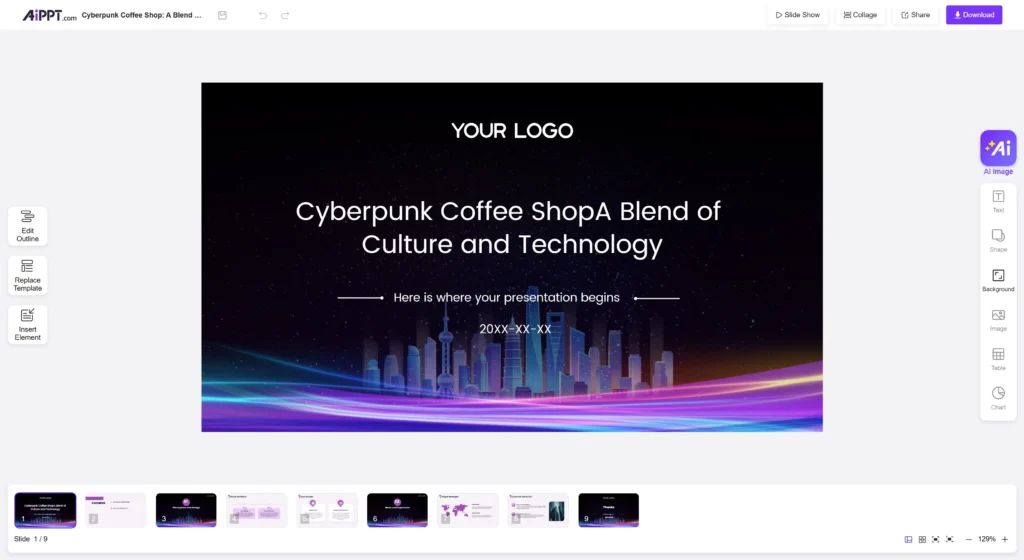
AI PPT places a strong emphasis on making data “come alive.” It includes dedicated tools for adding infographics, animations, and complex charts directly within the editor. The platform’s marketing highlights its ability to move beyond “static slides” into more dynamic visual storytelling. This focus appeals to users who present to audiences that demand high visual stimulation, such as in advertising or sales.
-
Seamless Editing and Export
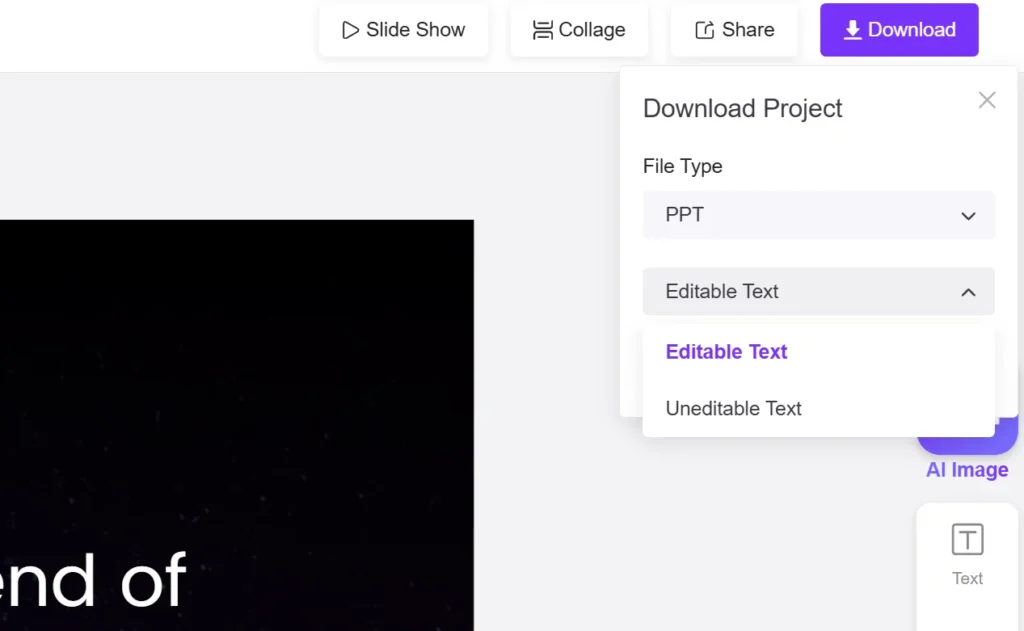
Recognizing that the world still runs on Microsoft Office, AI PPT offers robust export options. Users can download their creations as editable PPTX files, PDFs, or images. The internal editor is designed to feel familiar to PowerPoint users, with similar toolbars and drag-and-drop functionality, lowering the barrier to entry for those migrating from legacy software.
Pricing and Accessibility Model
AI PPT competes aggressively on price, positioning itself as a high-value, lower-cost alternative.
-
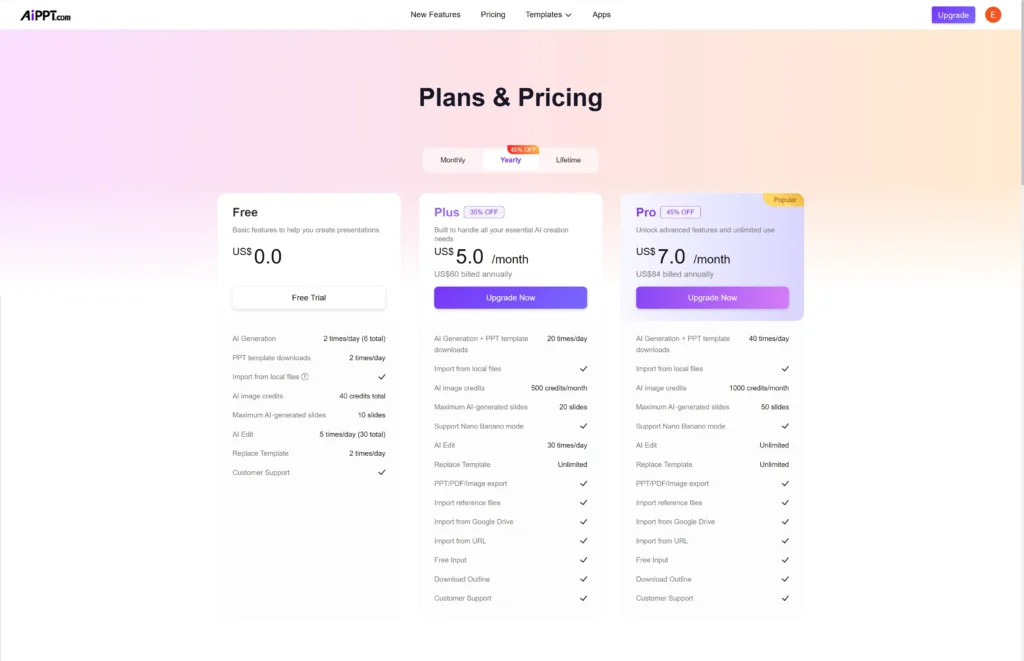
Basic/Pro Plans: Pricing is generally lower than enterprise tools, with monthly plans often cited around $6.99 to $8.99.
-
Billing: Annual options reduce this cost further, making it an attractive “impulse buy” for students or freelancers.
-
Credits System: Some features, like AI image generation, may be metered by credits , a common model in 2026 AI tools.
Part 3: Comprehensive Feature Comparison
Having established the identities of both tools, we now move to the direct comparison. In this section, we will strip away the marketing and look at the functional reality of using Autoppt versus AI PPT in a 2026 workflow. We will analyze four critical dimensions: Template Libraries, Workflow, Output Quality, and Productivity.
-
Template Libraries: The Paradox of Choice
In the world of presentation design, the template is the foundation. It dictates the credibility of the speaker before they even open their mouth.
AI PPT: The Library of Alexandria
With 200,000+ templates 9, AI PPT offers an unparalleled breadth of choice.
-
Pros: The likelihood of finding a hyper-specific theme is high. You can find templates that match specific holiday themes, obscure industry verticals, or fleeting design trends.
-
Cons: The “Netflix Problem.” Users can easily spend 45 minutes just browsing templates, paralyzed by the sheer number of options. Furthermore, quality control across 200,000 assets is difficult; older templates may not support modern AI text reflow features as well as newer ones.
Autoppt: The Curated Boutique
Autoppt takes the opposite approach with a library of 1,000+ curated templates.3
-
Pros: Every template is “Business Ready.” The focus is on high-quality typography, readability, and modern aesthetics. The “One-Click Switch” technology works flawlessly because the templates are built to a uniform technical standard. You don’t browse for hours; you pick a style (e.g., “Minimalist,” “Corporate,” “Creative”) and go.
-
Cons: If you need a template with cartoons of cats for a veterinary presentation, you might have fewer specific options than in AI PPT’s massive database.
Insight: In 2026, Time is often more valuable than Choice. Autoppt’s curated approach minimizes decision fatigue, while AI PPT’s massive library caters to the “hunter-gatherer” designer who enjoys the search.
-
Workflow & Ease of Use: Friction Analysis
How easy is it to get from “Idea” to “Finished Deck”?
Autoppt: The “Three-Step” Sprint
Autoppt is engineered for minimum friction. The workflow is strictly linear: Topic -> Template -> Generate.
-
Learning Curve: Extremely low (Reviewers rate Ease of Use at 9.0/10 ).
-
Input Processing: The “Doc-to-Deck” engine is praised for its ability to ingest complex documents (PDF/Word) and output a structured deck without manual intervention.
-
Mind Map Integration: The inclusion of the Mind Map tool creates a workflow that supports thinking. Users can structure their thoughts visually before committing to slides, preventing the need for massive rewrites later.
AI PPT: The “Power-User” Dashboard
AI PPT offers a workflow that mimics traditional design software, with added AI layers.
-
Learning Curve: Moderate. While accessible, the abundance of menus and options (Infographics, Smart Outline, Animations) presents a steeper learning curve than Autoppt’s streamlined interface.
-
Interactive Outline: The “Chat with AI” step to refine the outline is powerful but adds time to the process. It requires the user to be an active participant in the generation, rather than just a director.
Insight: Autoppt is built for the “Result-Oriented” user who wants the deck finished now. AI PPT is built for the “Process-Oriented” user who wants to tinker with the details along the way.
-
Output Quality: Design Logic and Content Density
The “Generic” Trap
A common criticism of AI tools is that they produce “hallucinated fluff”—slides that look good but say nothing.
-
AI PPT: User reviews indicate that while the visual output is decent, the content can sometimes feel “generic”. Users often have to spend time rewriting the bullet points to make them sound human and insightful.
-
Autoppt: Autoppt combats this by generating High-Volume Decks (20-30 slides). By defaulting to a longer, more comprehensive format, it forces the AI to dig deeper into the topic. Instead of 5 surface-level slides, you get a deep dive. This “Content Density” is a major advantage for professional and academic users who need substance over style.
Visual Consistency
-
Autoppt: Because the templates are curated, the text reflow is excellent. The AI rarely generates text that runs off the edge of the slide or overlaps with images.
-
AI PPT: With a wider range of templates, users may occasionally encounter layout breaks where the AI-generated text doesn’t quite fit the pre-designed text boxes of a specific template.
-
Productivity & Time Savings
Speed of Generation
-
Autoppt: Consistently clocked at generating a full 20-30 page deck in under one minute. This is described as “unmatched speed”.
-
AI PPT: Speed varies based on the complexity of the “Smart Outline” interaction and the chosen template.
The “Drafting” Phase
Autoppt effectively eliminates the drafting phase. By generating a high-volume draft instantly, the user moves straight to editing. AI PPT often requires the user to spend time in the “Outlining” phase before the slides are built.
Part 4: Real-Life Use Cases and Scenarios
To truly understand the value of these tools, we must step out of the theoretical and into the practical. Let us examine three distinct “User Personas” typical of 2026 and see how each tool serves their specific needs.
Scenario A: The University Student (The Thesis Defense)
-
Persona: David, a PhD candidate in Environmental Science.
-
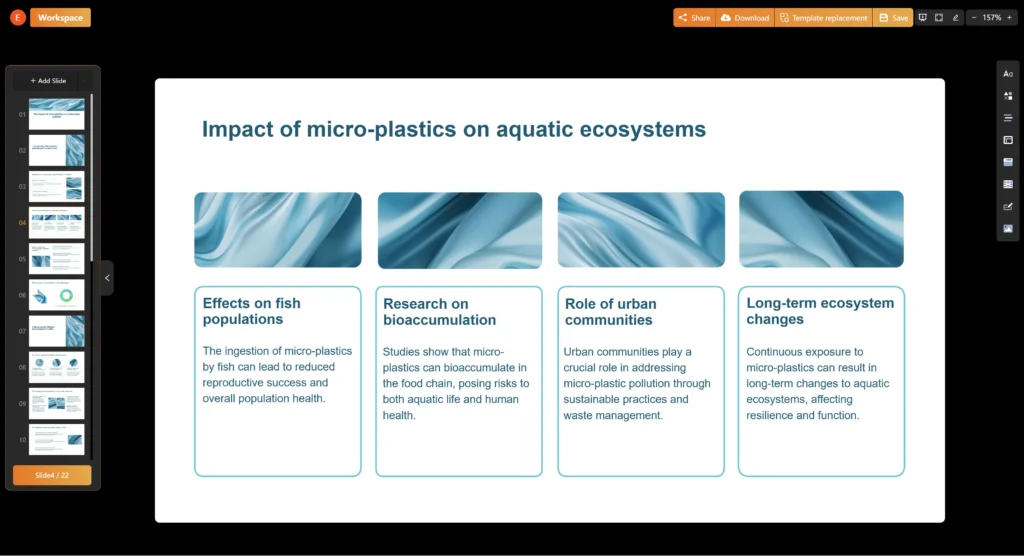
The Task: Convert a 50-page PDF thesis on “Micro-plastics in Urban Waterways” into a 25-slide presentation for a defense committee.
-
The Constraint: David is stressed, has zero design skills, and needs the presentation to look academically rigorous, not “salesy.”
-
The Winner: Autoppt.
-
Why: The Doc-to-Deck feature is the deciding factor. David can upload his 50-page PDF directly. Autoppt’s NLP engine will extract the Introduction, Methodology, Data Analysis, and Conclusion, mapping them to a clean, professional template. The ability to generate 25+ slides ensures that none of his complex data is left out. The Mind Map feature helps him verify that the AI has understood the logical hierarchy of his argument before he generates the slides. The curated template library ensures he doesn’t accidentally choose a “Creative Agency” theme that would look unprofessional in a thesis defense.
Scenario B: The Freelance Graphic Designer (The Creative Pitch)
-
Persona: Elena, a freelance brand strategist.
-
The Task: Create a mood board and pitch deck for a new “Cyberpunk Coffee Shop” client.
-
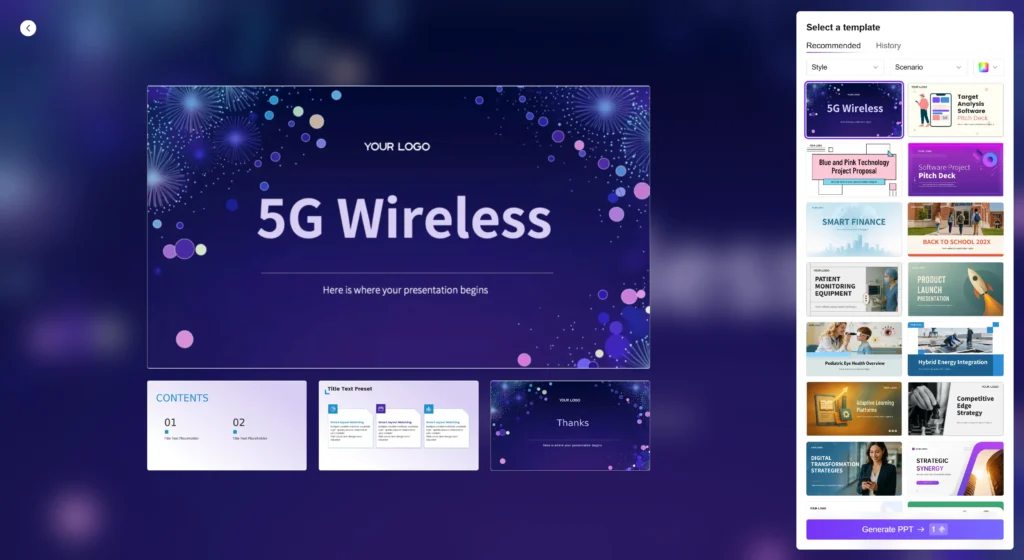
The Constraint: Needs a highly specific, edgy aesthetic. The content is thin (just a few keywords), but the vibe must be perfect.
-
The Winner: AI PPT.
-
Why: The 200,000+ Template Library is Elena’s playground. She can search for “Neon,” “Cyberpunk,” or “Dark Futuristic” and likely find a template that hits the exact visual note she needs. The ability to fine-tune infographics and add animations allows her to add the “wow factor” that her client expects. She doesn’t need Autoppt’s deep text generation; she needs AI PPT’s visual variety.
Scenario C: The Corporate Manager (The Weekly Review)
-
Persona: Sarah, a Regional Sales Manager.
-
The Task: Present the weekly sales figures to the VP. She has the data in a Word doc. She has 15 minutes before the meeting.
-
The Constraint: Speed is everything. Consistency is key (it must look like a business deck).
-
The Winner: Autoppt.
-
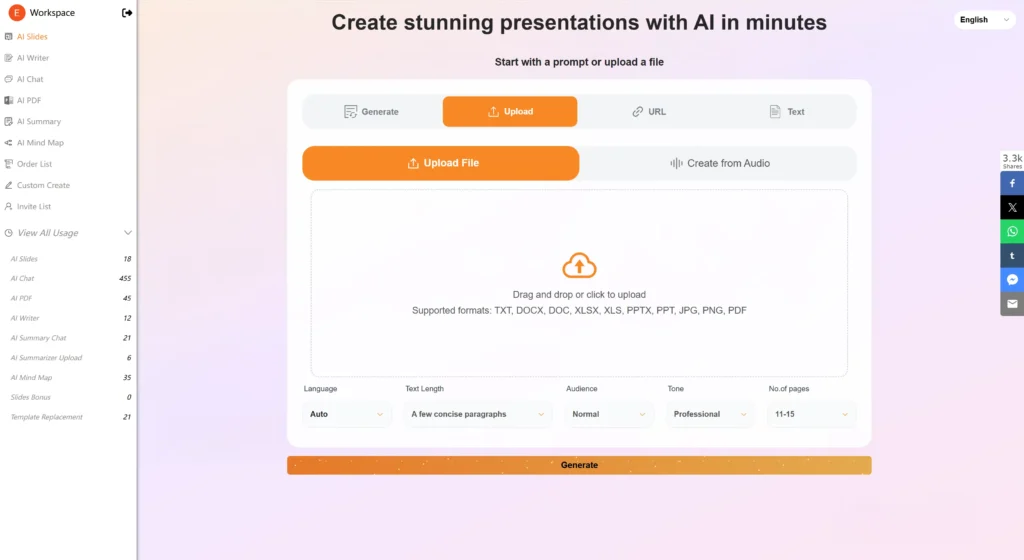
Why: Sarah cannot afford to browse templates. She needs reliability. She uses Autoppt, uploads her Word doc, selects the “Corporate Blue” template, and hits generate. In 60 seconds, she has a 20-slide deck. She deletes the 5 slides she doesn’t need, uses the One-Click Summarizer on a slide that is too wordy, and walks into her meeting 5 minutes early. The Efficiency of Autoppt saves her career reputation for timeliness.
Part 5: How Autoppt Improves Work Efficiency
In 2026, “Efficiency” is not just about doing things faster; it is about cognitive offloading. It is about preserving your mental energy for the tasks that AI cannot do. Autoppt is engineered specifically to maximize this cognitive efficiency.
-
Eliminating “Task Paralysis”
Psychologically, the hardest part of any project is starting. This is known as “Task Paralysis” or “Activation Energy.” When a user stares at a blank PowerPoint interface, the brain sees a mountain of micro-decisions: What font? What size? Where does the title go? What color is the background?
Autoppt removes this mountain. By allowing the user to start with a simple text prompt or a file upload, it lowers the activation energy to near zero. The user isn’t “Designing a Presentation”; they are simply “Uploading a File.” This psychological shift is profound. It allows users to start projects they might otherwise procrastinate on.
-
The “One-Click” Efficiency Architecture
Autoppt’s interface is built around the concept of “Single-Action Solutions.”
-
Context: In traditional software, changing a design theme might involve 20 clicks (Slide Master -> Theme -> Colors -> Apply to All -> Check for Errors).
-
Autoppt Solution: The One-Click Template Switch reduces this to a single interaction.
-
Context: Brainstorming a structure usually involves writing on a whiteboard, then transcribing to notes, then typing into slides.
-
Autoppt Solution: The One-Click Mind Map digitizes the brainstorming phase instantly, creating a structural artifact that can be directly converted to slides.
-
Cognitive Offloading via “Smart Defaults”
Autoppt makes thousands of micro-decisions for the user. It chooses the optimal font size for readability. It selects the contrast ratio that meets accessibility standards. It aligns images to the golden ratio. By handling these “invisible” design tasks, Autoppt frees up the user’s cognitive bandwidth to focus on the narrative and the data. You stop thinking about pixels and start thinking about persuasion.
Part 6: Pricing, Accessibility, and Trust
In the diverse economy of 2026, a tool must be both affordable and trustworthy.
Autoppt Pricing Analysis
Autoppt’s pricing strategy is designed to be “barrier-free.”
-
The Freemium Advantage: The ability to generate a full presentation, 15 mind maps, and process PDFs for $0 is a massive trust signal. It allows users to verify the quality of the “Doc-to-Deck” engine before committing credit card details.
-
The Professional Tiers: At $19.99/mo (Pro) and $39.99/mo (Unlimited), Autoppt positions itself as a premium productivity tool. While higher than some basic tools, the ROI for a professional saving 3-4 hours per deck is immense. If a manager’s time is worth $50/hour, the tool pays for itself in the first 30 minutes of use.
AI PPT Pricing Analysis
-
The Low-Cost Leader: With plans starting around $6.99 – $8.99/mo , AI PPT is aggressively priced. This makes it very attractive for students or casual users who need a tool for one-off projects.
-
Hidden Costs: Users should be aware of potential credit limits for premium features like AI image generation, which can add to the cost if heavy usage is required.
Credibility and Reviews
-
Autoppt: While some platforms lack extensive third-party reviews due to the rapid rise of the tool, user feedback on forums like Reddit highlights its “unmatched speed” and the utility of the Mind Map feature. The “Doc-to-Deck” feature is consistently cited as a “standout”.
-
AI PPT: Reviews acknowledge the massive template library but occasionally flag the “generic” nature of the output. Trustpilot reviews for related domains often highlight the importance of customer support, which Autoppt includes in its paid plans.
Part 7: Summary Comparison Table
To help you visualize the differences, we have compiled a data-driven comparison of the two tools as they stand in 2026.
| Feature Dimension | Autoppt | AI PPT (aippt.com) |
| Primary Philosophy | Speed, Structure, & Content-First | Visual Variety & Design Choice |
| Slide Generation Volume | High (20-30 slides/min) | Standard (varies by input) |
| Template Ecosystem | 1,000+ Curated, Professional | 200,000+ Massive Library |
| Document Conversion | PDF, Word, TXT (Deep semantic extraction) | PDF, Word, URL, Google Drive |
| Unique Visual Tools | Integrated AI Mind Map , Charts | Smart Outline, Infographics, Animations |
| Workflow Friction | Low (3-Step: Topic > Template > Done) | Medium (Chat > Outline > Edit > Design) |
| Language Support | 100+ Languages (Global Ready) | Multiple Languages |
| Pricing Model | Freemium / $19.99 Pro / $39.99 Unlimited | Subscription (~$8.99/mo Pro) |
| Ideal For | Business, Academic, Research (Heavy Content) | Creative, Freelance, Niche Design |
Part 8: Conclusion and Final Verdict
The Decision Framework
As we conclude this deep research report, the choice between Autoppt and AI PPT in 2026 is not about which tool is “better” in a vacuum; it is about which tool is better for you.
Both platforms represent the pinnacle of AI-assisted design. They both successfully solve the problem of the blank page. They both offer capabilities that would have seemed like magic just a few years ago. However, their diverging philosophies dictate their utility.
The Case for AI PPT
If you are a user who values Design Exploration, AI PPT is a formidable choice. Its massive library of 200,000+ templates creates a sandbox of infinite visual possibilities. If your primary goal is to find a very specific, niche aesthetic—and you are willing to spend the time browsing and refining—AI PPT offers the breadth of resources to satisfy that creative itch. It is the tool for the “Hunter,” the user who enjoys the search for the perfect asset.
The Case for Autoppt
If, however, your primary goal is Outcome Efficiency, Autoppt is the undisputed leader.
Autoppt understands that for the vast majority of students, researchers, and business professionals, a presentation is a means to an end, not the end itself. The goal is to communicate an idea, get approval, or pass a defense—and to do so as quickly as possible.
By prioritizing High-Volume Generation, Deep Document Analysis, and Integrated Mind Mapping, Autoppt streamlines the entire workflow. It eliminates the drafting phase entirely. It turns a 50-page PDF into a presentation in the time it takes to sip a coffee. It offers a level of “Content Density” that ensures your slides are not just pretty, but substantive.
In the fast-paced, high-stakes environment of 2026, time is the one resource you cannot buy more of. Autoppt buys you time. It allows you to stop being a “Slide Arranger” and start being a “Storyteller.”
Recommendation:
For the modern professional or student who needs to turn complex information into professional presentations with zero friction, Autoppt is the superior choice. Its focus on speed, structure, and ease of use aligns perfectly with the demands of the 2026 workflow.
Create worry-free presentations with AutoPPT . Turn your ideas into slides quickly—while keeping them 100% yours!
About AutoPPT: An easy use AI tool for students and professionals. Generate editable slides, customize designs, and focus on what matters—your unique ideas.

Autoppt: Generate presentations in 1 minute!
Start Free Trail Now