


Michael Anderson
Former journalist turned tech writer with a passion for helping professionals enhance productivity through AI.
I. Executive Summary: The 2026 AI Creative Utility Landscape
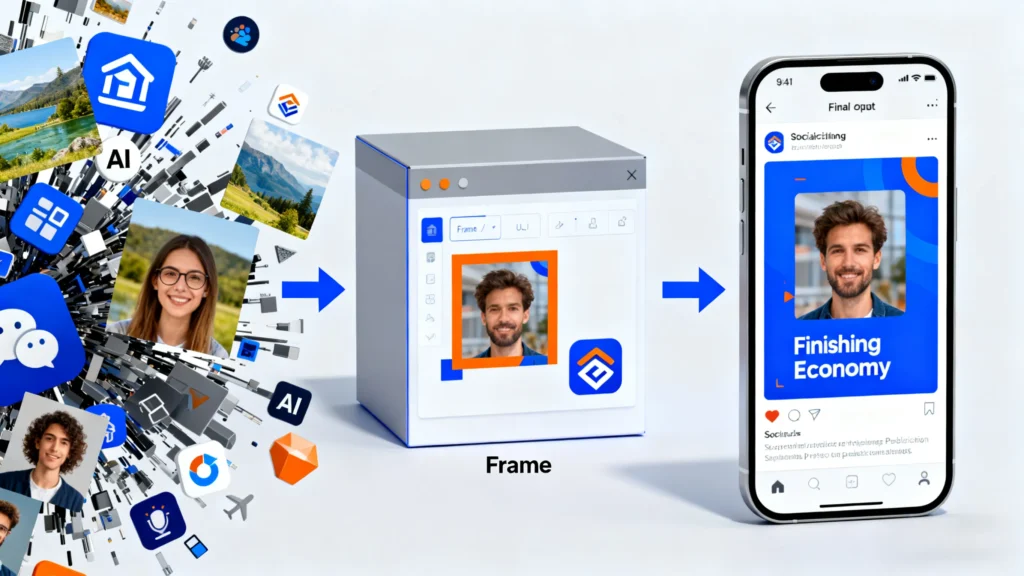
This report analyzes the niche but strategically significant market for “AI photo frame generators.” This user-facing search term does not represent a standardized product category but rather a “shadow market” indicator. It signals a widespread and maturing user need to finish, brand, and contextualize the massive volume of content being produced by generative AI (GenAI).
The key competitive battleground for creative AI in 2026 has moved beyond raw image generation. The focus is now on the “last mile” of content creation: bridging AI-generated drafts with publication-ready, branded, and commercially-safe assets. The concept of “framing” is a critical, representative function of this last mile.
Our analysis of the market landscape deconstructs this ambiguous term into four distinct sub-categories that are often conflated by users:
-
Generative Outpainting: Professional tools that extend an image’s canvas.
-
Prompt-to-Frame Generation: Creator tools that generate decorative borders from text.
-
AI-Assisted Design Platforms: Mass-market tools that use AI for adjacent tasks while offering static frame libraries.
-
Specialized Utilities: Niche e-commerce and social media tools that automate a single framing task.
The primary differentiator for professional and enterprise adoption in 2026 is no longer generation quality, which is rapidly becoming a commodity. The “great filter” is now the clarity, ownership, and legal indemnity of Intellectual Property (IP) rights. This report identifies starkly different and strategically critical IP models, from Adobe’s “enterprise-safe” indemnity and PFPMaker’s “user-first” ownership guarantee , to Recraft’s “IP-as-product” freemium model.
The strategic outlook shows the market is rapidly moving away from standalone, single-function tools. The future is integrated “Creative Operating Systems” and automated “AI agents”. In this paradigm, “framing” will cease to be a button a user clicks and will instead become an automated, context-aware step in a larger generative workflow (e.g., “Generate a 10-post social media campaign and apply our brand’s motion frame”).
II. Market Taxonomy: Deconstructing the “AI Photo Frame”
A. An Ambiguous Term for a Maturing Need
The term “AI Photo Frame Generator” is a non-technical, user-facing query that covers multiple, distinct technologies. This ambiguity is a symptom of a market in flux, where users lack the precise vocabulary for new generative functions. Research into user search behavior reveals a profound disconnect; queries for “AI photo frame” often lead to tools for AI headshots , general AI photo editors , or broad AI image generators.
This ambiguity, however, presents a strategic opportunity for a market leader to define the category by correctly diagnosing the “Job-to-be-Done” (JTBD) behind the “frame” query. The user’s need is not literally for a “frame” but for a function:
-
For photographers: The need is to “Fix my composition” or “Change my aspect ratio”.
-
For marketers: The need is to “Make this photo on-brand” or “Make this post thematic”.
-
For e-commerce: The need is to “Show this product in a real-world context”.
B. Category 1: Generative Outpainting (The Professional/Photographer Market)
This category uses generative AI to extend the canvas of an existing photograph. The technology is commonly known as “outpainting.” The AI analyzes the pixels at the image’s edge and generates new, context-aware content, effectively creating a seamless border or “frame” from the image’s own content.
-
Key Players & Features:
-
Skylum Luminar Neo: Features “GenExpand”.
-
Adobe Firefly (in Photoshop): Features “Generative Expand”.
-
Recraft: Features “Inpaint and outpaint” to “Edit inside or beyond the frame”.
-
-
Target Audience & Use Case: Professional photographers and high-end prosumers. The goal is non-destructive, photorealistic editing. The AI’s success is measured by its invisibility.
-
Workflow: This is used for fixing poor composition, changing aspect ratios for different platforms (e.g., converting a 3:2 camera image to a 4:5 Instagram post ), or creating artistic “infinity” images for high-resolution print.
C. Category 2: Prompt-to-Frame Generation (The Creator/Marketer Market)
This is the most literal interpretation of the user’s query. This technology uses text-to-image generation that is constrained to the border of an existing, uploaded image. The user provides a text prompt describing the desired frame elements, theme, and artistic style.
-
Key Players & Features:
-
Microsoft Designer: The “Frame Image” feature is the purest example of this technology. A user can upload a photo and use a prompt like “Happy birthday, balloons, presents, ribbons” in a specific style like “doodle art” to generate a thematic border.
-
Recraft: Its generative model operates within a familiar design workflow of “layers and frames” , allowing users to generate vector elements around a central image, effectively creating a prompt-driven frame.
-
-
Target Audience & Use Case: Social media creators, small business marketers, and casual users.
-
Workflow: The goal is speed and thematic consistency, allowing for the rapid creation of a decorative border for a social media post, digital greeting card, or ad creative.
D. Category 3: AI-Powered Design Platforms (The Mass Market/Small Business)
This category functions as a “Trojan Horse.” The platform’s AI does not generate the frame. Instead, the platform has a massive static library of pre-made, vector-based frames, and the AI’s role is as an assistant for adjacent tasks (like background removal or text generation).
-
Key Players & Features:
-
Canva: The clear market leader. The user finds “frames” (which are static image placeholders) in the Elements tab. The “AI” is located in “Magic Studio” , which includes “Magic Edit” (powered by Leonardo AI ), “Magic Eraser,” and “Background Remover”.
-
Fotor: This platform “Add[s] frames to photos online for free” from a “massive photo frames” library. This feature is separate from its “AI Photo Editor” and “AI Image Generator”.
-
Pixlr: A “Free Online AI Photo Editor, Image Generator & Design tool” that includes a “Photo Collage Maker” , which relies on static frame layouts, not generative AI.
-
-
Target Audience & Use Case: The mass market, small businesses, and non-designers who rely on a fast, classic “drag-and-drop” design process. These platforms effectively leverage the search traffic for “AI photo frame” by using AI as a marketing halo, even if the frame feature itself is not AI-driven.
E. Category 4: Specialized AI Utilities (The Niche/E-commerce Market)
This category consists of AI models trained on a single, specific utility task, not for general-purpose creation.
-
Key Players & Features:
-
PFPMaker: A specialist tool for social media profile pictures. Its AI removes the image background and then automatically generates hundreds of variations by applying different pre-made “frames” (borders, gradients, simple colored backgrounds).
-
Filotechno “A.I. Framer”: An e-commerce and print specialist. This tool is an AI recommendation engine. The user uploads their artwork, and the AI analyzes its colors to suggest and visualize physical, real-world frame and matboard combinations that are available for purchase.
-
-
Target Audience & Use Case: These tools serve niche business needs. PFPMaker is for any individual or brand needing a new profile picture. A.I. Framer is for artists, print-on-demand sellers, and e-commerce stores selling physical art. This “A.I. Framer” model represents a key future trend: vertically integrated AI that is not a tool but a sales funnel, linking creative visualization directly to a purchase.
III. Market Dynamics & Strategic Drivers (2025-2026)
A. Driver 1: Maturation Beyond Hype (The “Trough of Disillusionment”)
The 2025 Gartner Digital Marketing Hype Cycle places “Generative AI” in the “Trough of Disillusionment”. This market position is not a failure but a critical maturation. The initial hype (2022-2024) has been replaced by practical, enterprise-level scrutiny.
According to market analysis, this phase is characterized by a realization of the “limitations of GenAI for automated copywriting,” citing a rise in low-quality, generic “AI-slop”. This “slop” problem creates the business case for the next wave of AI tools. The demand for “AI photo frames” is a direct response to this. A “frame” is a tool of control—a way to enforce brand consistency (colors, logos), context (themes), and professionalism on top of otherwise generic AI-generated images. Therefore, the “Trough of Disillusionment” is the primary demand driver for the creative utility market, as customers shift from “AI, create anything” to “AI, create this specific thing, in my brand’s style, and make it commercially safe.”
B. Driver 2: The Content Scale & The “Finishing Economy”
The market is contending with an unprecedented scale of content generation. Over 34 million AI images are created every day , and over 15 billion have been created since 2022. Adobe Firefly alone has been used to generate over 7 billion images since its launch.
When raw generation becomes a commodity (34 million per day), the economic value shifts from generation to finishing. The market is now in a “Finishing Economy.” “Finishing” includes branding, editing, contextualizing, and formatting for a specific channel. “Frames” are a classic finishing tool. This explains why emerging platforms like Recraft are not just “image generators” but full design suites with tools for brand kits, mockups, and scalable vectors—all of which are “finishing” tools.
C. Driver 3: Workflow Integration (The “Creative OS”)
The market is consolidating from standalone, single-task tools (e.g., an “upscaler,” a “background remover”) into fully integrated, multi-functional platforms.
-
Canva’s “Creative Operating System” : This November 2025 announcement explicitly signals this shift. The strategy is to fuse “design, AI, and marketing into one connected workspace” , moving beyond simple tools to an all-encompassing workflow.
-
Gartner’s “AI agents for marketing” : This is cited as the top trend for 2025-2026. This represents the “workflow automation” layer. An AI agent does not wait for a user to find the “frame” tool; it suggests or applies a frame as part of an automated content generation sequence.
-
Pantone & Microsoft Partnership : The “Pantone Palette Generator” (Nov 2025), built on Azure OpenAI and integrated into Pantone Connect, is a perfect example of this. It is an AI utility (palette generation) embedded directly into an existing professional workflow, demonstrating the future of integrated AI.
D. Driver 4: The Rise of Multimodality (Motion & AR)
Static images merge with video and audio. A “frame” is no longer just a static PNG border. The query for “motion photo frames ai” and “AR frames” is forward-looking.
-
The Adobe Firefly Video Model , announced in 2025, brings generative video (text-to-video, image-to-video) and audio tools (“Generate Soundtrack”) to the Firefly platform. This implies that “Generative Extend” will apply to video, creating motion frames or extending video scenes.
-
Midjourney v6 already includes a “motion preview mode”.
-
The ultimate destination for social media “frames” is as Augmented Reality (AR) filters. Tools that integrate with Meta’s platforms to offer an “Export as Instagram AR Filter” option for their generated frames will be positioned to capture a significant part of the creator market.
IV. Key Player Analysis: Platforms, Challengers, and Specialists
A. Introduction to Market Quadrant Analysis
To provide a clear strategic overview, the key players identified in the research have been segmented based on their core technology and target audience. This quadrant analysis cuts through marketing hype to reveal their true market position and strategy.
B. AI Creative Tool Market Quadrant (2026)
| Tool | Vendor | Target Audience | Core “Frame” Technology (Market Category) | IP/Ownership Model | Commercial Safety Status | Pricing Model (USD) |
| Firefly | Adobe | Enterprise & Pro Creatives | 1. Generative Outpainting (GenExpand ) | User Owns Output | High (Indemnity Offered) | Credit-based Subscription (Starts $9.99/mo) |
| Designer | Microsoft | Consumers & Small Business | 2. Prompt-to-Frame (Frame Image) | [needs verification] (Likely User Owns) | [needs verification] | Free (Bundled w/ Copilot/365) |
| Canva | Canva | Small Business & Mass Market | 3. AI-Assisted Platform (Static Frames ) | User Owns Output (Subject to library terms) | High (Uses licensed/safe content) | Freemium (Pro unlocks AI helpers ) |
| Luminar Neo | Skylum | Pro Photographers | 1. Generative Outpainting (GenExpand ) | Ambiguous (User-Restrictive) | Medium (Onus on user) | One-time Payment (Starts $99) / Sub |
| Recraft | Recraft | Graphic Designers & Marketers | 2. Prompt-to-Frame (Vector/SVG Gen) | Bifurcated (Vendor Owns Free / User Owns Paid) | Low (Free) / High (Paid) | Freemium (Paid plans unlock IP) |
| PFPMaker | PFPMaker | Social Media Users | 4. Specialized Utility (AI Templates ) | User Owns Output | High | Freemium (Free for basics) |
| A.I. Framer | Filotechno | E-commerce / Art Sellers | 4. Specialized Utility (AI Recommender) | N/A (Utility) (User owns upload ) | High | Free to use (Monetizes via frame sales) |
| Fotor | Fotor | Mass Market / Prosumer | 3. AI-Assisted Platform (Static Frames) | [needs verification] (Likely User Owns) | Freemium (Pro starts $3.99/mo) | |
| Leonardo AI | Leonardo AI | Prosumers & Game Designers | 1. Generative Outpainting (Canvas tools) | Bifurcated (Vendor Owns Free / User Owns Paid) | Low (Free) / High (Paid) | Freemium (Credit-based) |
| Midjourney | Midjourney | Artists & Prosumers | 1. Generative Outpainting (Pan/Zoom tools) | Bifurcated (Vendor Owns Free / User Owns Paid) | Low (Trained on public data) | Paid Subscription only |
| Pixlr | Pixlr | Mobile-First / Mass Market | 3. AI-Assisted Platform (Static Frames ) | [needs verification] (Likely User Owns) | Freemium |
C. Detailed Player Analysis: Strategic Profiles
-
The Platform Giants (The Incumbents)
-
Adobe (Firefly / Express): Adobe’s strategy is to win the enterprise market by leveraging its legal and financial weight. Its “frame” feature (Generative Expand ) is technically excellent, but its real product is commercial safety. By offering IP indemnity for enterprise customers and stating clearly that the customer owns the output , Adobe provides a “safe harbor” that no risk-averse corporation can ignore. Its credit-based pricing model is designed to integrate Firefly as a utility across its entire Creative Cloud ecosystem.
-
Microsoft (Designer): Microsoft’s strategy is commoditization and mass distribution. The “Frame Image” tool is a pure prompt-to-frame generator, and it is offered for free. By bundling this capability directly into Copilot and Microsoft 365, Microsoft is setting the consumer price-point expectation to $0, creating immense pressure on freemium models like Canva and Fotor.
-
Canva: Canva’s strategy is to be the “Creative Operating System”. Its “frames” are a library of static assets , not a generative feature. Canva’s AI (Magic Studio ) is used for helper tasks (e.g., “Magic Edit” ) that augment its core value proposition: an all-in-one design, collaboration, and brand-kit platform. Canva is betting that the integrated workflow is more valuable than any single generative feature.
-
The Specialist Challengers (The Innovators)
-
Skylum (Luminar Neo): Skylum’s strategy is to be the “Anti-Adobe” for photographers. Its “GenExpand” directly competes with Photoshop’s. Its key market differentiator is its business model: offering a perpetual (one-time) license instead of a subscription, which is highly appealing to its target audience. However, as analyzed in Section V, its complex and restrictive EULA is a significant hidden liability.
-
Recraft: Recraft’s strategy is to win the professional designer market. It avoids direct competition with photorealistic editors and focuses on vectors (SVG) , mockups, and icon sets. Its “frame” is the design canvas itself. Its business model is an “IP-as-Product” strategy —the free tier is a demo, and the product being sold is commercial ownership and privacy.
-
Leonardo AI / Midjourney: These are “power-user” tools. Their “frame” capability is implicit in their inpainting/outpainting and “pan/zoom” features. Their strategy is to win on model quality and style , targeting artists and prosumers who demand creative control above all else.
-
The Niche & Utility Players (The Specialists)
-
PFPMaker: PFPMaker’s strategy is search-term domination. It wins by being the best, fastest, and simplest solution for one specific, high-volume query (“profile picture maker”). Its user-first IP policy is a core feature, eliminating friction and building trust to support its freemium model.
-
Filotechno (A.I. Framer): This is the most unique “frame” tool. It is a vertically integrated e-commerce sales funnel. The AI is not a creative partner but a virtual sales assistant, using color theory to recommend physical products , thus reducing friction from creative visualization to purchase.
V. Critical Deep Dive: The Intellectual Property Fault Line
A. Introduction: IP as the “Great Filter” of 2026
Intellectual Property is the “Great Filter” that will separate the winning enterprise-grade tools from the mass of consumer/hobbyist toys. The legal terms of service are not boilerplate; they are the core of the business model and the primary strategic differentiator in a market where generation quality is converging. An enterprise legal department will never approve a tool that (a) exposes the company to an infringement lawsuit or (b) grants the tool vendor ownership of the company’s generated marketing assets. The research reveals four distinct and strategic IP models.
B. Case Study 1: The “Enterprise Safe Harbor” (Adobe)
-
Policy Analysis: Adobe’s Generative AI terms for enterprise customers are explicit. Outputs are “Customer Content”. “As between Adobe and the customer, the customer owns and controls Firefly outputs”. “Adobe does not assert any IP rights in the output”.
-
Strategic Implication: This is the only model viable for Fortune 500 companies. Adobe is using its legal and financial weight to offer IP indemnity , a promise that no startup can match. This creates a powerful “safe-harbor” moat, making Adobe the de facto choice for risk-averse industries.
C. Case Study 2: The “Radical User-First” Model (PFPMaker)
-
Policy Analysis: PFPMaker’s Terms of Service are a masterclass in building user trust. “You retain all ownership rights to the photos and images you upload”. “You own all images generated or edited using the AI tools”. “We do NOT claim any ownership of your uploaded photos”. “We do NOT use your photos to train AI models”.
-
Strategic Implication: This is a “pro-consumer” and “pro-creator” model. It eliminates all IP anxiety, making it the default, trusted choice for its high-volume, low-stakes audience. This trust is the foundation of its freemium conversion funnel.
D. Case Study 3: The “IP-as-Product” Model (Recraft)
-
Policy Analysis: Recraft employs a brilliant bifurcated model. “Images created by users on the Free plan are owned by Recraft“. “Images created under a paid plan grant you full ownership and commercial rights, and they can be kept private”.
-
Strategic Implication: This is a monetization strategy. Recraft is not just selling AI tools; it is selling privacy and ownership. The free plan is a public demo. The moment a user wants to use an image commercially or privately, they are forced to convert to a paid plan. The IP term is the conversion driver.
E. Case Study 4: The “Restrictive & Ambiguous” Model (Skylum)
-
Policy Analysis: Skylum’s legal documents are complex and defensive. The AI Guidelines and EULA focus heavily on prohibitions. Users are “expressly prohibited” from using GenAI features for training other AI/ML models. Users are also prohibited from creating output “in the style of” any living artist.
-
Strategic Implication: This model places the entire legal burden on the user. Unlike Adobe, Skylum offers no indemnity. By explicitly banning “style of” prompts, they are attempting to shield themselves from infringement lawsuits, while leaving the user exposed. This ambiguity makes it a very risky choice for any professional commercial work.
F. Synthesis & Recommendation
For any B2B or professional application, only the “Enterprise Safe Harbor” (Adobe) or “Radical User-First” (PFPMaker) models are acceptable. The “IP-as-Product” model (Recraft) is a viable business strategy but unsuitable for enterprise use. The “Restrictive” model (Skylum) is a significant, unmanaged risk.
VI. End-User Workflow & Application Analysis
A. Workflow 1: The Social Media Creator (The Speed Workflow)
-
Goal: Create a themed “Happy Fall” post for Instagram in under 3 minutes.
-
Tool: Microsoft Designer (“Frame Image”).
-
Steps:
-
Open Designer and select “Frame Image”.
-
Upload a photo of a person holding a coffee cup.
-
In the “Elements” prompt box, type: “Layers of clouds with autumn leaves”.
-
In the “Style” box, select “Doodle art”.
-
Click “Generate.” Designer provides four options.
-
Select the favorite and download directly.
-
-
Analysis: This workflow prioritizes speed and thematic consistency over photorealism or pixel-level control.
B. Workflow 2: The Professional Photographer (The Quality Workflow)
-
Goal: Re-crop a portrait to a 16:9 aspect ratio for a video thumbnail without losing any of the subject.
-
Tool: Adobe Firefly (Generative Expand).
-
Steps:
-
Open the portrait in Adobe Photoshop.
-
Select the Crop tool. Set the aspect ratio to “16:9”.
-
Drag the crop handles outward to extend the canvas horizontally, leaving empty space on the left and right.
-
Ensure the “Generative Expand” option is selected and leave the text prompt field blank.
-
Click “Generate.” Firefly analyzes the existing background and fills the empty space with a seamless, photorealistic extension.
-
Review the generated variations and select the best one.
-
-
Analysis: This workflow prioritizes photorealism, control, and non-destructive editing. The “frame” is the invisible, AI-generated extension of the original image.
C. Workflow 3: The E-commerce Art Seller (The Utility Workflow)
-
Goal: Quickly visualize a new art print in various physical frames to show on a Shopify store.
-
Tool: Filotechno “A.I. Framer”.
-
Steps:
-
Navigate to the A.I. Framer website and upload the art print (e.g., a PNG file).
-
The AI automatically analyzes the predominant colors of the artwork.
-
The tool “in real time propose[s] 9 matching combinations” of physical frames and matboards.
-
The user enters the desired print dimensions (e.g., “Width: 24 inches, Height: 36 inches”).
-
The tool displays the final price for the physical, framed product.
-
-
Analysis: This is not a creative workflow; it is a sales conversion funnel. The AI is a virtual sales assistant , reducing friction from “I like this art” to “I’m buying this framed art.”
D. Workflow 4: The Brand Marketer (The Consistency Workflow)
-
Goal: Create a set of 5 consistent, on-brand illustrations for a new ad campaign.
-
Tool: Recraft.
-
Steps:
-
Start a new project in Recraft.
-
Upload the brand’s style guide or a few existing brand assets to create a “Custom Style”.
-
Generate the first image (e.g., “illustration of person using a laptop, in”).
-
Use the “Generate illustration set or photoshoot” feature to create 4 more variations with different subjects, all adhering to the same custom style and color palette.
-
Use the “frames” and “layers” workflow to add the brand’s logo and tagline.
-
Export all 5 assets as SVG files for scalable use on web and in print.
-
-
Analysis: This workflow prioritizes brand consistency, scalability (vectors), and workflow efficiency over single-image photorealism.
VII. Strategic Outlook & Recommendations for Market Entry
A. Future Trend 1: The Rise of “AI Agents” and Proactive Workflows
The market is moving beyond reactive tools (where a user must find and use a “frame” button) to proactive agents. The “AI agents for marketing” trend and “conversational” interfaces (like Adobe’s “Project Moonlight” ) mean users will soon describe an end-state, not build it.
-
Future Scenario: A user in a presentation tool will type, “Make a 5-slide deck on our Q3 results. Use our brand kit. Frame the headshots of the exec team and use a ‘cinematic’ style for the product shots.” The agent will perform all these tasks, including framing, automatically as part of a single, automated workflow.
B. Future Trend 2: Multimodal & Immersive Frames (Motion & AR)
Static PNG/JPG frames are table stakes. The next frontier is motion and immersion.
-
Motion: As evidenced by Adobe’s Firefly Video Model and Midjourney’s motion preview , the demand for “motion frames” (animated borders, generative video extensions) for digital ads and social media (e.g., exporting as MP4, animated GIF) will become standard.
-
AR: The ultimate destination for social media “frames” is as AR filters. Tools that integrate with Meta’s platforms to “Export as AR filter” will capture a significant part of the creator market.
C. Future Trend 3: The “Great IP Filter” and Market Bifurcation
As analyzed in Section V, the market will permanently bifurcate based on IP.
-
Market 1 (Enterprise/Professional): Will be dominated by a few “safe harbor” players like Adobe who offer full user ownership and legal indemnity. This market will compete on safety, reliability, and workflow integration.
-
Market 2 (Consumer/Hobbyist): Will be a “wild west” of freemium tools, startups, and open-source models (like Stable Diffusion ) where IP is ambiguous, shared, or vendor-owned. This market will compete on price (free) and novelty.
D. Strategic Recommendations for Market Entry
For a B2B, presentation-focused tool that adds “framed photos to slides,” the audience is primarily business professionals.
-
Do Not Compete on General Generation: The market is saturated by Adobe, Midjourney, and Microsoft. Building a standalone “AI frame generator” is not a viable strategy.
-
Vertically Integrate a Utility: The opportunity is to build a specific generative utility inside an existing presentation workflow. The focus must be on the “job to be done” for a business professional: “Make this slide look professional fast.”
-
Build an “AI Layout Agent,” Not a “Frame Tool”: The winning feature is an “AI Layout Agent” that proactively suggests “AI-ready layouts” when a user uploads an image. This agent would, in one click, analyze the image, suggest 3-5 layout options, and automatically apply a contextual frame (e.g., a simple, clean border) that matches the presentation’s brand kit. This aligns perfectly with the “AI agents” and “Creative OS” trends.
-
Make IP Your #1 Feature: Any B2B tool must launch with an “Enterprise Safe” IP model. The terms of service must state, from day one, that the user owns 100% of the output and that the AI models are trained on commercially safe, licensed data. This, more than any feature, will be the single biggest selling point to the B2B clients such a tool is targeting.
Create worry-free presentations with AutoPPT . Turn your ideas into slides quickly—while keeping them 100% yours!
About AutoPPT: An easy use AI tool for students and professionals. Generate editable slides, customize designs, and focus on what matters—your unique ideas.

Autoppt: Generate presentations in 1 minute!
Start Free Trail Now