


Michael Anderson
Former journalist turned tech writer with a passion for helping professionals enhance productivity through AI.
Introduction
An onboarding presentation is your chance to welcome new employees and introduce them to your company’s culture, values, and expectations. It’s more than just a slideshow—it’s the first step in helping new hires feel at home and ready to succeed. A great onboarding presentation can boost engagement and set the stage for a productive start. But let’s be honest: creating one from scratch can feel overwhelming, especially if you’re short on time or design skills.
That’s where AI steps in to save the day. Tools like Autoppt, an AI-powered presentation maker, make it easy to build professional, eye-catching onboarding presentations in minutes. In this guide, we’ll walk you through how to use AI to create an onboarding presentation that wows new hires, with a special focus on why Autoppt is the perfect tool for the job.

Why Onboarding Presentations Matter
A strong onboarding presentation does more than share information—it builds excitement and connection. New hires want to know what the company stands for, who they’ll work with, and what’s expected of them. Without a clear and engaging presentation, they might feel lost or disconnected.
The challenge? Crafting something that’s informative, visually appealing, and tailored to your audience takes effort. AI tools like Autoppt simplify this by handling the heavy lifting, so you can focus on the message.
The Essentials of a Great Onboarding Presentation
What to Include
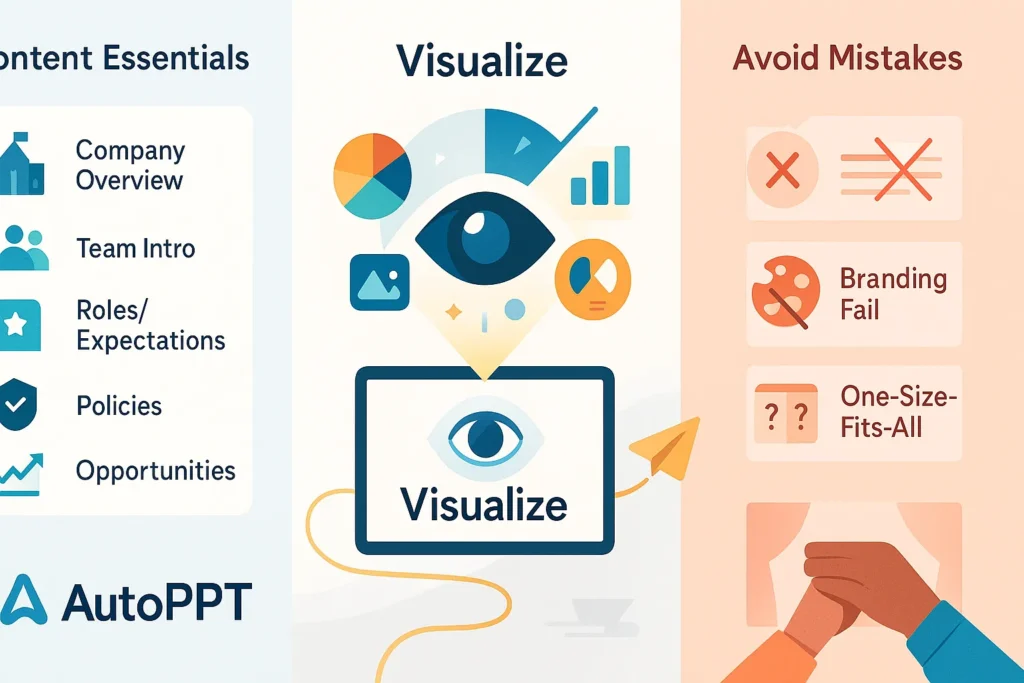
To make your onboarding presentation effective, cover these must-haves:
-
Company Overview: Share your company’s story, mission, and values.
-
Team Introductions: Highlight key team members and the org chart.
-
Roles and Expectations: Explain the new hire’s job and what success looks like.
-
Policies and Procedures: Outline key rules, like attendance or safety guidelines.
-
Growth Opportunities: Show how they can learn and advance.
Make It Visual
Nobody wants to stare at walls of text. Use pictures, charts, and simple graphics to bring your points to life. A clean, visual design keeps new hires interested and helps them remember what you’re sharing.
Avoid These Slip-Ups
-
Too Much Text: Stick to short, punchy bullet points.
-
Ignoring Branding: Use your company’s colors and logo for a pro look.
-
One-Size-Fits-All: Adjust the content for different teams or roles.
How AI Makes Onboarding Presentations Easier
AI presentation tools are like having a design assistant on speed dial. They take your ideas and turn them into polished slides, fast. For onboarding, this means less time stressing over layouts and more time perfecting your welcome.
Autoppt stands out because it’s built to handle the whole process— from generating slides to tweaking them for your needs. It’s a time-saver that keeps your presentation consistent and sharp.
Why Autoppt Is Your Go-To Tool
Autoppt comes packed with features that make it a top pick for onboarding:
-
AI Slide Creation: Type a topic or upload a file, and watch slides appear instantly.
-
File Conversion: Turn PDFs or Word docs into presentations with one click.
-
Templates: Pick from sleek, ready-made designs that look great.
-
Customization: Change colors, fonts, and layouts to match your brand.
-
Language Options: Supports over 100 languages—perfect for global teams.
-
Easy Sharing: Export or send a link to share with new hires.
These tools make it simple to create a presentation that’s both professional and personal.
Step-by-Step: Building Your Presentation with Autoppt
Here’s how to whip up an onboarding presentation using Autoppt:
Step 1: Know Your Goals
Decide what you want new hires to take away. Are you focusing on culture? Job duties? Department details? Nail this down first.
Step 2: Gather Your Info
Pull together your content—think employee handbooks, team intros, or policy summaries. Have it ready to go.
Step 3: Let Autoppt Work Its Magic
Upload your files or type your ideas into Autoppt. In seconds, it’ll create a draft presentation for you.

Step 4: Make It Yours
Tweak the design—add your logo, adjust colors, or move slides around. Make it feel like your company.
Step 5: Add Some Fun
Throw in animations or quick polls to keep things lively. Autoppt’s editing tools make this a breeze.

Step 6: Double-Check
Review everything. Does it flow? Is it clear? Polish it up and you’re done.
Top Tips for Onboarding Presentations
-
Keep It Short: Focus on the essentials—don’t overload them on day one.
-
Use Great Visuals: Add images or charts to explain tricky stuff.
-
Tell a Story: Share a fun fact about the company or a team win.
-
Make It Interactive: Ask a question or add a quiz to get them involved.
-
Think Accessibility: Use big text and clear colors so everyone can follow.
Personalizing with AI
New hires love feeling special. With Autoppt, you can customize slides for each person—think role-specific tips for a marketer versus an engineer. It’s a small touch that makes a big difference, and AI makes it quick and easy.
Real Results with Autoppt
Companies big and small rave about Autoppt. One startup used it to build an onboard presentation in under an hour, leaving new hires impressed and engaged. Studies show AI tools like this can cut onboarding time by 20% and boost satisfaction by 30%. It’s a win-win.
Conclusion
A great onboarding presentation sets new hires up to thrive—and with Autoppt, it’s easier than ever to make one. This AI tool saves you time, keeps things professional, and lets you add a personal touch. Ready to give it a shot? Sign up for Autoppt’s free trial and see the difference for yourself.
Create worry-free presentations with AutoPPT . Turn your ideas into slides quickly—while keeping them 100% yours!
About AutoPPT: An easy use AI tool for students and professionals. Generate editable slides, customize designs, and focus on what matters—your unique ideas.

Autoppt: Generate presentations in 1 minute!
Start Free Trail Now